Reseñas
4.5
4 reseñas
100% de las reseñas recomiendan este producto.
Very cool
JCrazy . 1 month ago
Not exactly as advertised
Noviceretiree . 1 month ago
- Línea telefónica fija no incluida.
- La elegibilidad para transferir tu número telefónico residencial varía.
- Basado en la duración promedio de la batería en condiciones de uso normal. Rendimiento promedio esperado con uso típico. La duración real de la batería depende de factores como la red, las funciones seleccionadas, la frecuencia de las llamadas, el uso de datos y otros patrones de uso de aplicaciones. Los resultados pueden variar.
- Si el teléfono fijo al que está conectado el Voice Gateway requiere energía eléctrica externa para funcionar, el servicio (incluida la capacidad de hacer y recibir llamadas 911) no estará disponible durante un corte de energía.
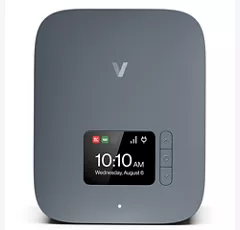
Fácil de navegar.
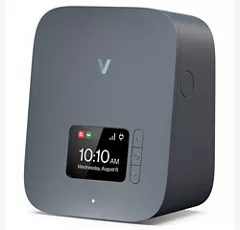
Pantalla fácil de usar.
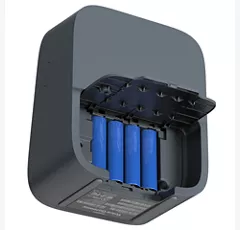
Las funciones que te encantan.

Oír y hacerte oír.
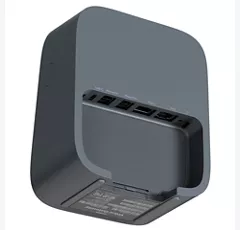
Puertos y conectividad.
Fácil de navegar.
Pantalla fácil de usar.
Diseño
Tamaño
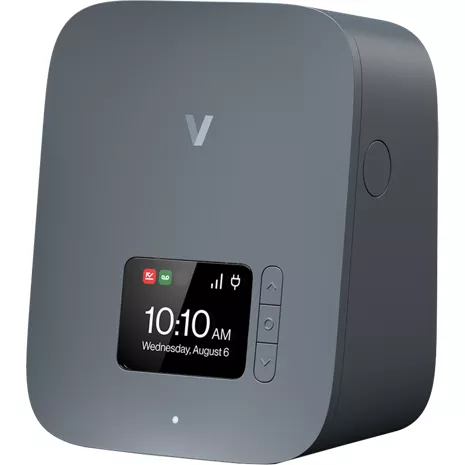
5.9" (alto) x 2.9" (profundidad) x 4.7" (ancho)
Peso
15.3 oz (sin antena externa) | 16.5 oz (con antena externa)
Pantalla
2.4" LCD, RGB
Batería
Batería
Batería AA de disulfuro de hierro de litio (Li-FeS2) x 4 (no recargable) | 24 horas de tiempo de espera
Red
Bandas LTE/5G
B2/B4/B5/B13/B48/B66 | N2/n5/n48/n66/n77
Rendimiento
Wi-Fi
Wi-Fi 6, 2.4 GHz y 5 GHz
Memoria
Flash: 512 MB | RAM: 512 MB
Ethernet
1 Gbps
Puertos
RJ45 (ethernet) | RJ11 x 2 (teléfono/fax) | RJ31 (alarma)
Encendido
Tipo USB-C
SKU Nº
SKU Nº
VG10A
En la caja
- Verizon Voice Gateway, VG10A
- Antena externa (2)
- Adaptador eléctrico USB-C
- Cable RJ11
- Soporte de montaje
- Guía de inicio rápido
- Línea telefónica fija no incluida.
- La elegibilidad para transferir tu número telefónico residencial varía.
- Basado en la duración promedio de la batería en condiciones de uso normal. Rendimiento promedio esperado con uso típico. La duración real de la batería depende de factores como la red, las funciones seleccionadas, la frecuencia de las llamadas, el uso de datos y otros patrones de uso de aplicaciones. Los resultados pueden variar.
- Si el teléfono fijo al que está conectado el Voice Gateway requiere energía eléctrica externa para funcionar, el servicio (incluida la capacidad de hacer y recibir llamadas 911) no estará disponible durante un corte de energía.
Reseñas de Verizon Voice Gateway
4.5
4 reseñas
100% de las reseñas recomiendan este producto.
Very cool
JCrazy . 1 month ago
Not exactly as advertised
Noviceretiree . 1 month ago
Clara62 . 1 month ago
Clarity but...
Nick H . 1 month ago
Verizon Voice Gateway Preguntas frecuentes
Meeg . Nov 5, 2026
Is there a way to only allow calls from certain phone numbers?
This device does not support a 'white/allow list' for certain numbers. -Sara
2433 . Nov 4, 2026
what is the monthly cost
For information on plan costs and purchasing the Voice Gateway contact us by visiting here: https://www.verizon.com/digital/nsa/nos/ui/ngd/contactus -Joe
Stacey . Nov 2, 2026
How to set up voicemail?
You can find the steps for setting up voicemail here: https://espanol.verizon.com/support/knowledge-base-14613/ ~Jesse
Allison . Nov 2, 2026
We just got a Verizon Voice Gateway. I get the caller's number listed but they all have "Unknown Name". Is there a way to have the caller's name also listed on my caller ID?
For assistance with the features of your Verizon Voice Gateway, please reach out for assistance here: https://www.verizon.com/digital/nsa/nos/ui/ngd/contactus -Joe
Rhonda . Oct 31, 2026
Will dishnet VIP 722 receiver work with voice gateway
Yes, the Dish Network ViP 722 receiver will work with a Verizon Voice Gateway, but how it functions depends entirely on whether you are trying to connect it for phone line services or internet capabilities. -Necia
BILL . Oct 27, 2026
IS THE SERVICE UNLIMITED CALLING? HOW MANY VOICE MAILS IS ALLOWED?
Please contact us using one of the methods in the link below, we are happy to review all options available to you https://www.verizon.com/digital/nsa/nos/ui/ngd/contactus -Anthony
Please reach out to use using one of the methods in the link below. We would be happy to help look at all options available to you. https://www.verizon.com/digital/nsa/nos/ui/ngd/contactus -Anthony
Carol . Oct 27, 2026
Do I have to have internet at my home to use this for my land line?
No, you do not need traditional wire line home internet, because the Verizon Voice Gateway connects traditional landline phones using Verizon 4G/5G cellular data or VoIP. ~Ivone
Doxiemom . Oct 24, 2026
What does the blinking red light mean qhen plugging in the voice gateway
For troubleshooting assistance, please contact us so that we can assist by visiting: https://www.verizon.com/digital/nsa/nos/ui/ngd/contactus. -Necia
Senior . Oct 22, 2026
Can I keep my home phone number when switching to Verizon Voice Gateway?
Verizon Voice Gateway lets you keep your old phone number. Eligibility to port your home number varies. -Christopher
Mary . Oct 21, 2026
Why doesn’t this device merge two calls? No one seems to understand why it doesn’t merge. Have used conference 3-way calling for years on landline now I have this device since Verizon is no longer supporting copper wired phone service and will not merge
To initiate a three-way call using a Verizon wireless home phone base unit: While on an active call, press the Flash button (or Talk button on cordless handsets). The first caller is placed on hold and a dial tone will sound. Dial the 10-digit telephone number of the second party. After the second party answers, press the Flash button again to merge both parties into a single conference call. If the telephone handset does not feature a dedicated Flash button, press and immediately release the switch hook (the hang-up cradle button) for one second to simulate the flash signal. If the calls disconnect or fail to bridge after following these steps, the 3-Way Calling feature may not be provisioned or active on the cellular line profile. Because reviewing and modifying feature codes requires account access, please connect with a representative to inspect the line settings by visiting https://espanol.verizon.com/support/contact-us/ or calling 1-800-922-0204.