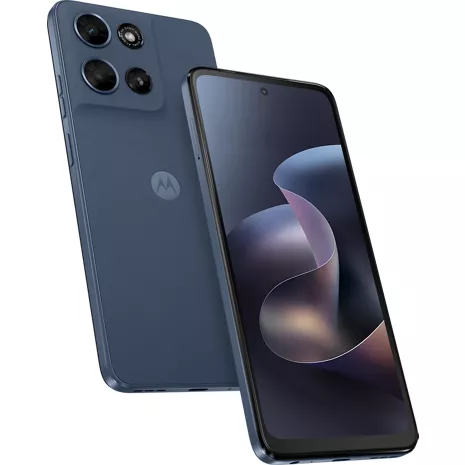
Motorola moto g - 2026 Prepaid
4.1
39 indefinido
82
Moto
John . 8 days
Too big to carry easily, too small to be a pad
John Nowak . 26 days
Motorola Customer Care - 25 days
Hi John, We're sorry to hear that your experience with the phone hasn't met your expectations. We understand your concerns regarding the device's size, the news feed, and Bluetooth functionality. For Bluetooth concerns, we recommend restarting your phone, toggling Bluetooth off and on, and checking for available software updates. You may also try forgetting the paired device and pairing it again. For assistance with disabling the news feed, please check your home screen settings for available feed options. If the Bluetooth concern persists or you need further assistance, please send us an email at supportforums@motorola.com, and we'll be happy to help you from there. Thank you for sharing your feedback with us. -Mitch
- Una frecuencia de actualización mínima del dispositivo de 60 Hz y una frecuencia de actualización máxima de 120 Hz; la frecuencia de actualización real puede ser inferior y variar en función de las limitaciones y los requisitos de la aplicación/el contenido, la configuración del modo del dispositivo y otros factores.
- El sensor de 50 MP combina cuatro píxeles en uno, para una resolución fotográfica efectiva de 12.5 MP.
- El servicio 5G está disponible con un plan 5G. Se requiere cobertura de red 5G; disponible solo en ciertas áreas. Comunícate con tu proveedor de servicio para obtener más información.
- La memoria ampliada con RAM Boost requiere el uso del almacenamiento interno del teléfono como memoria virtual, lo que disminuye la capacidad de almacenamiento; el almacenamiento disponible para el usuario es menor mientras está en uso; la función está activada por defecto a menos que se desactive.
- La capacidad típica es de 5200 mAh. El valor típico es la capacidad promedio estimada de un lote de baterías según pruebas internas, que representa el rendimiento esperado en condiciones normales. La capacidad nominal es de 5100 mAh. La capacidad nominal es la capacidad mínima garantizada de una batería bajo condiciones controladas.
- Todas las afirmaciones de duración de la batería son aproximadas y se basan en pruebas del usuario promedio en un perfil de uso combinado (que incluye el tiempo de uso y de espera) con condiciones de red óptimas. El rendimiento real de la batería varía y depende de muchos factores, como la intensidad de la señal, la configuración de la red y del dispositivo, la temperatura, el estado de la batería y los patrones de uso.
- El cargador se puede vender por separado. Velocidad máxima de carga TurboPower™ de 30 W en el dispositivo; requiere un cargador Motorola TurboPower™ de 30 W o superior; los cargadores de mayor capacidad no aumentarán la capacidad de carga máxima. El cargador incluido varía según el mercado. Consulta la disponibilidad con tu proveedor de servicio o distribuidor.
- El sensor de 32 MP combina 4 píxeles en uno, para una resolución fotográfica efectiva de 8 MP.
- El diseño resistente al agua crea una barrera que ayuda a proteger contra la exposición moderada al agua, como los derrames accidentales, las salpicaduras, el sudor o la lluvia ligera. No está diseñado para inmersión o exposición al agua u otros líquidos con presión; no es resistente al agua.

Diseño elegante y duradero.

Pantalla superbrillante y supersuave de 6.7".

Sistema de cámaras impulsado por inteligencia artificial.

Rendimiento superrápido de 5G3.

Batería de larga duración + carga TurboPower™7.

Audio multidimensional con altavoces estéreo.
Diseño elegante y duradero.
Pantalla superbrillante y supersuave de 6.7".
Diseño
Colores
PANTONE Slipstream
Profundidad
0.33 pulgadas
Largo
3.0 pulgadas
Altura
6.58 pulgadas
Ancho
0.33 pulgadas
Materiales notables
Parte trasera de cuero vegano, Corning® Gorilla® Glass 3
Peso
7.12 onzas
Puerto de carga
USB-C
Accesibilidad
Auditivo
Compatibilidad con dispositivos auditivos, subtítulos en directo, transcripción en directo, texto en tiempo real, notificaciones
Asistente de voz
Google Gemini, Google Assistant
Movilidad/cognitiva
Accesibilidad con interruptores
Compatible con equipos de asistencia auditiva
PASS
Visual
Ampliación, Texto y visualización, TalkBack, Seleccionar para hablar
Red
4G
Las velocidades 4G LTE oscilan entre 11 y 75 Mbps para las descargas y entre 1 y 13 Mbps para las cargas. Ideal para llamadas de voz, descarga de archivos, navegación por Internet y otras actividades que no requieren un mayor ancho de banda.
Wi-Fi
Wi-Fi 802.11 a/b/g/n/ac | 2.4 GHz y 5 GHz | Hotspot Wi-Fi
SAR
SAR en la cabeza: 1.37 W/kg | SAR en el cuerpo: 1.39 W/kg
FCC ID
IHDT56AT9
Red de roaming y global
b1 / b2 / b4 / b5 / b8
Cobertura 5G Nationwide
Las velocidades 5G varían entre 35 Mbps y 143 Mbps para las descargas y entre 5 y 31 Mbps para las cargas. Ideal para videojuegos, streaming y otras actividades de ancho de banda constante.
Banda ultra ancha 5G
Las velocidades de 5G Ultra Wideband oscilan entre 195 y 634 Mbps para las descargas y entre 10 y 53 Mbps para las cargas. Ideal para trabajar, compartir archivos, videoconferencias y otras actividades con gran ancho de banda.
Dispositivo World
Sí, funciona en más de 200 países según tu plan.
Batería
Tiempo máximo de inactividad
624 horas
mAh (por hora)
5200mAh
Tiempo de uso
69 horas
Carga rápida
Sí
Funciones adicionales
WEA
3.0
Prop 65
Sí, Daños en el sistema reproductivo
Cámara
Cámara trasera
Sensor de 50MP | Apertura f/1.8 | Tamaño de píxel de 0.61 μm | Tecnología Quad Pixel para 1.22 μm | PDAF
Cámara frontal
32MP | apertura f/2.2 | tamaño de píxel de 0.64 μm
Video
Cámara principal trasera: FHD (30 fps) | Cámara macro trasera: HD (30 fps) | Cámara frontal: FHD (30 fps)
Modos de cámara
Retrato, Modo Pro, Cabina de Fotos, Visión Nocturna, Captura Automática de Sonrisas, Selfie con Gestos, Retoque Facial, Animación de Selfie, Espejo de Foto Selfie
Rendimiento
Bluetooth
Sí
Almacenamiento
128 GB | 4 GB RAM, tarjeta microSD expansible de hasta 1 TB
Procesador
MediaTek Dimensity 6300
SO
Android™ 16
Memoria expandible
hasta 12 GB ampliables con RAM Boost
Hotspot
Sí
Seguridad
Lector de huellas dactilares, desbloqueo facial, ThinkShield
Pantalla
Frecuencia de actualización
120Hz
Pantalla
LCD | Corning® Gorilla® Glass 3
Relación de aspecto
20:9
MOTXT2613V
- Smartphone moto g - 2026
- Cable tipo USB
- Herramienta para tarjeta SIM
- Guías
- Una frecuencia de actualización mínima del dispositivo de 60 Hz y una frecuencia de actualización máxima de 120 Hz; la frecuencia de actualización real puede ser inferior y variar en función de las limitaciones y los requisitos de la aplicación/el contenido, la configuración del modo del dispositivo y otros factores.
- El sensor de 50 MP combina cuatro píxeles en uno, para una resolución fotográfica efectiva de 12.5 MP.
- El servicio 5G está disponible con un plan 5G. Se requiere cobertura de red 5G; disponible solo en ciertas áreas. Comunícate con tu proveedor de servicio para obtener más información.
- La memoria ampliada con RAM Boost requiere el uso del almacenamiento interno del teléfono como memoria virtual, lo que disminuye la capacidad de almacenamiento; el almacenamiento disponible para el usuario es menor mientras está en uso; la función está activada por defecto a menos que se desactive.
- La capacidad típica es de 5200 mAh. El valor típico es la capacidad promedio estimada de un lote de baterías según pruebas internas, que representa el rendimiento esperado en condiciones normales. La capacidad nominal es de 5100 mAh. La capacidad nominal es la capacidad mínima garantizada de una batería bajo condiciones controladas.
- Todas las afirmaciones de duración de la batería son aproximadas y se basan en pruebas del usuario promedio en un perfil de uso combinado (que incluye el tiempo de uso y de espera) con condiciones de red óptimas. El rendimiento real de la batería varía y depende de muchos factores, como la intensidad de la señal, la configuración de la red y del dispositivo, la temperatura, el estado de la batería y los patrones de uso.
- El cargador se puede vender por separado. Velocidad máxima de carga TurboPower™ de 30 W en el dispositivo; requiere un cargador Motorola TurboPower™ de 30 W o superior; los cargadores de mayor capacidad no aumentarán la capacidad de carga máxima. El cargador incluido varía según el mercado. Consulta la disponibilidad con tu proveedor de servicio o distribuidor.
- El sensor de 32 MP combina 4 píxeles en uno, para una resolución fotográfica efectiva de 8 MP.
- El diseño resistente al agua crea una barrera que ayuda a proteger contra la exposición moderada al agua, como los derrames accidentales, las salpicaduras, el sudor o la lluvia ligera. No está diseñado para inmersión o exposición al agua u otros líquidos con presión; no es resistente al agua.
Motorola moto g - 2026 Prepaid undefined
4.1
39 undefined
82
Too big to carry easily, too small to be a pad
John Nowak . 26 days
Motorola Customer Care - 25 days
Hi John, We're sorry to hear that your experience with the phone hasn't met your expectations. We understand your concerns regarding the device's size, the news feed, and Bluetooth functionality. For Bluetooth concerns, we recommend restarting your phone, toggling Bluetooth off and on, and checking for available software updates. You may also try forgetting the paired device and pairing it again. For assistance with disabling the news feed, please check your home screen settings for available feed options. If the Bluetooth concern persists or you need further assistance, please send us an email at supportforums@motorola.com, and we'll be happy to help you from there. Thank you for sharing your feedback with us. -Mitch
Karen 01 . 1 month
Motorola Customer Care - 1 month
Thank you for sharing your feedback, Karen 01. We’re glad to hear that you find your Motorola phone user-friendly and familiar compared with your previous Edge 2022. We appreciate you choosing Motorola and hope you continue enjoying your new device! -Mitch
Great phone with easy transition. Sleek and manageable.
DrJan . 1 month
Motorola Customer Care - 1 month
Hi DrJan, thank you for sharing such wonderful feedback! We’re delighted to hear that you’re enjoying your new Motorola phone, especially its sleek design, vibrant display, and easy navigation. We’re also glad the transition has been smooth and that you’re taking the time to explore its features. We truly appreciate your support and hope you continue enjoying your Motorola experience! -Mitch
Moto G Phone
HOLLY . 2 months
Motorola Customer Care - 2 months
Hi HOLLY, We’re sorry to hear about your experience with the Moto G 2026. We understand your concerns regarding security and battery life. As a first step, please review Settings > Security & privacy to make sure your screen lock, app permissions, and other security features are properly configured. We also recommend checking Settings > Battery > Battery usage to identify apps that may be consuming excessive power. Keeping the phone updated under Settings > System > Software updates, reducing screen brightness, and limiting background activity for apps you don’t frequently use may also help improve battery life.If the concerns persist, please send us an email at supportforums@motorola.com with more details about the features you’re concerned about and your battery experience. Our team will be glad to help you from there. -Mitch
Good deal
Josh . 2 months
Motorola Customer Care - 2 months
Hi Josh, We’re glad to hear your Motorola has been working great for you! It’s wonderful to know you’re enjoying the quick launch features, camera, expandable storage, and overall value. We appreciate you taking the time to share your detailed experience and recommendation. Thank you for choosing Motorola! -Mitch
Love the easy transition
Goseecal . 2 months
Motorola Customer Care - 2 months
Hi Goseecal, thank you for the wonderful feedback! We're thrilled to hear that you're enjoying the smooth transition, fast performance, long battery life, great sound, and bright display. We truly appreciate your support and hope you continue to enjoy your Motorola! -Mitch
Great Price
BravoMoto . 2 months
Motorola Customer Care - 2 months
Hi BravoMoto, thank you for sharing your wonderful feedback! We’re glad to hear that you’re enjoying your Moto G and that it provides the features, durability, and value you’re looking for. We truly appreciate your continued support of Motorola! -Mitch
Good phone
3 months
Motorola Customer Care - 3 months
Hi Oli2560, thank you for sharing your feedback! We're glad to hear that you're enjoying your Motorola phone and that your transition from the Moto Edge to the Moto G has been a positive experience. We appreciate your support and hope you continue to enjoy your device! -Mitch
An Adventure
3 months
Motorola Customer Care - 3 months
Thank you for sharing your experience with us, Scud. We're thrilled to hear that your first smartphone has been such a positive adventure and that you're enjoying discovering everything it can do. It's wonderful to know you like the display, audio quality, and overall experience. You're absolutely right that smartphones typically require more frequent charging than traditional flip phones because they perform many more tasks in the background. We're delighted that you're happy with your decision to make the switch, and we truly appreciate you choosing Motorola. We hope you continue to enjoy exploring all the features your new phone has to offer. -Mitch
Motorola moto g - 2026 Prepaid undefined
Larry . Oct 12, 2026
Can you shut it off when not in use
Hi Larry, thank you for your inquiry. Yes, you can turn off your Moto G (2026) when it’s not in use. To do so, press and hold the Power button, then tap Power off. Should there be any further inquiries, please do not hesitate to email supportforums@motorola.com. We'll be glad to help. -Mitch
Brian G . Oct 8, 2026
Is this phone QI capable
Hi Brian, we appreciate your interest in Motorola! The Moto G 2026 phone does not support Qi wireless charging. You can check this link for the phone specifications: https://www.motorola.com/us/en/p/phones/moto-g/moto-g-2026/pmipmhz42mm?pn=PB9D0012US -Mitch
Oct 8, 2026
If I pay for the phone in full, is I released from that company?
Hi Elizabeth, thank you for your inquiry! Paying off your phone in full does not necessarily mean it will be released from Verizon or unlocked. We recommend contacting Verizon directly to confirm their payment, service, and device unlocking policies. They will be able to provide the most accurate information regarding your phone’s eligibility for unlocking. -Mitch
marc . Oct 4, 2026
does this phone scan qr codes?
Cierra . Oct 1, 2026
Does it take an SD card?
Hi Cierra, thank you for your inquiry. Yes, the Moto G 2026 phone supports a microSD card for expandable storage, up to 1TB. You can check the phone specifications here: https://www.motorola.com/us/en/p/phones/moto-g/moto-g-2026/pmipmhz42mm?pn=PB9D0012US&tab=techspecs. -Mitch
DeeAy . Sep 28, 2026
What's in the box?
Hi DeeAy, thank you for your inquiry! The box includes the Moto G 2026 smartphone, a USB-Type cable, a SIM tool, and guides. We hope this information helps! -Mitch
Randy . Sep 25, 2026
Can you use a pen
Thank you for your inquiry, Randy. The Moto G 2026 phone does not include a stylus in the box and does not have a built-in stylus. You can visit the link for the phone specifications here: https://www.motorola.com/us/en/p/phones/moto-g/moto-g-2026/pmipmhz42mm?pn=PB9D0012US&tab=techspecs. -Mitch
Jackie . Sep 19, 2026
Can I purchase this phone without extending my contract. I just want to own my phoe without payments.
Hi Jackie, We’re sorry for any confusion. Since the purchase options, payment plans, and contract terms are determined by Verizon, we recommend contacting Verizon directly to confirm whether you can purchase the phone outright without extending your contract or making monthly payments. -Mitch
Judy . Sep 10, 2026
How long does it take to get new phone and set it all up in the store? Can I make an appointment?
Scheduling an appointment would be the fastest way to get your new device and set up help. Get started by clicking the link below. -Jaquetta https://www.verizon.com/nextgendigital/nos/storelocator/appointment/registration
Hi Judy, We’re sorry, but the time needed to get a new phone and complete the setup can vary by store and your specific needs. Since this is related to a Verizon store purchase and appointment, we recommend contacting Verizon directly to check their appointment availability and estimated setup time. They can provide the most accurate information for your local store. -Mitch