Reseñas
3.5
1567 reseñas
51% de las reseñas recomiendan este producto.
So-so. Basic function is OK but "features" and "support" are not.
trying to keep it simple . 6 months ago
Great option from having to carry a cell phone around your house all day
Us331242 . 8 months ago
2 Basado en la duración promedio de la batería en condiciones de uso típicas. Rendimiento promedio esperado con uso típico. La duración real de la batería depende de factores como la red, las funciones seleccionadas, la frecuencia de las llamadas, el uso de datos y otros patrones de uso de aplicaciones. Los resultados pueden variar.
3 Aunque el Wireless Home Phone tiene una batería de reserva, si el teléfono fijo al que está conectado el Wireless Home Phone requiere energía eléctrica externa para funcionar, el servicio (incluida la capacidad de realizar y recibir llamadas al 911) no estará disponible durante un corte de energía.
4 Necesitará al menos una cobertura moderada de Verizon Wireless en toda su ubicación para utilizar correctamente el servicio de Verizon Wireless Home Phone. Este dispositivo Wireless Home Phone está diseñado para brindar cobertura en tu ubicación de manera similar a la proporcionada con otros dispositivos de Verizon Wireless, pero Verizon Wireless no afirma que el servicio de Wireless Home Phone será igual que el servicio de línea telefónica fija.
Participa en conferencias.
Las funciones que te encantan.
Mantente conectado.
Oír y hacerte oír.
Pantalla fácil de usar.
Fácil de navegar.
Dos puertos.
Participa en conferencias.
Las funciones que te encantan.
Diseño
Profundidad
1.81 pulgadas
Tamaño
145 x 145 x 46 mm (con pie de goma)
Peso
15.87 onzas
Pantalla
Tamaño de la pantalla LCD 1.77 pulgadas, resolución 128 (RGB) * 160, modo de visualización normalmente blanco, paso de píxeles 0.073 (W) * 0.219 (H), Área activa 28.03 (W) x 35.04 (H)
Rendimiento
Procesador
GCT GDM7243Q
SKU Nº
SKU Nº
WHPLVP2
En la caja
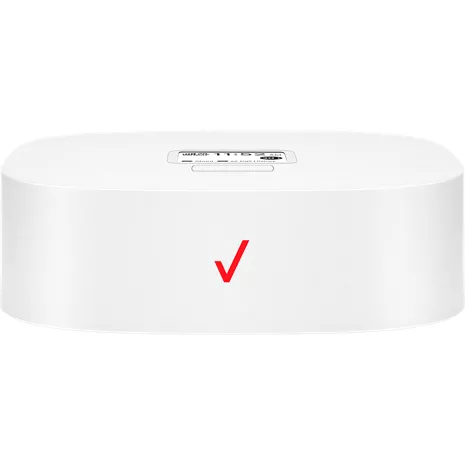
- Número de modelo de Wireless Home Phone: LVP2
- Batería estándar de Li
- Cargador de pared
- Cable RJ11
- Guía de consulta rápida
2 Basado en la duración promedio de la batería en condiciones de uso típicas. Rendimiento promedio esperado con uso típico. La duración real de la batería depende de factores como la red, las funciones seleccionadas, la frecuencia de las llamadas, el uso de datos y otros patrones de uso de aplicaciones. Los resultados pueden variar.
3 Aunque el Wireless Home Phone tiene una batería de reserva, si el teléfono fijo al que está conectado el Wireless Home Phone requiere energía eléctrica externa para funcionar, el servicio (incluida la capacidad de realizar y recibir llamadas al 911) no estará disponible durante un corte de energía.
4 Necesitará al menos una cobertura moderada de Verizon Wireless en toda su ubicación para utilizar correctamente el servicio de Verizon Wireless Home Phone. Este dispositivo Wireless Home Phone está diseñado para brindar cobertura en tu ubicación de manera similar a la proporcionada con otros dispositivos de Verizon Wireless, pero Verizon Wireless no afirma que el servicio de Wireless Home Phone será igual que el servicio de línea telefónica fija.
Comentarios sobre el Verizon Wireless Home Phone LVP2
3.5
1567 reseñas
51% de las reseñas recomiendan este producto.
So-so. Basic function is OK but "features" and "support" are not.
trying to keep it simple . 6 months ago
Great option from having to carry a cell phone around your house all day
Us331242 . 8 months ago
Don't buy it.
Megz . 11 months ago
This product works great for my mother in law
Soninlaw . 11 months ago
Verizon service
Michael Gent . 11 months ago
Very disappointed! Avoid!
Blind Bob . 12 months ago
The best home phone service
Dean . 1 year ago
Great Idea, Not Reliable
1 year ago
Felt like a Verizon employee
Fran g . 1 year ago
Wonderful alternative to a cell phone
PYaeger . 1 year ago
Preguntas frecuentes sobre el teléfono Verizon Wireless Home Phone LVP2
Hola . May 30, 2026
What is the battery?
The Verizon Wireless Home Phone LVP2 uses a 2800 mAh Lithium-Ion (Li-ion) rechargeable battery. It serves as a backup power source in case of power outages to keep your landline phone active. For more questions, contact Verizon Customer Service at 800-922-0204. -Ross
Kathleen . May 18, 2026
Once the LVP2 has been hooked up where can i find the direction's to set up for the cordless landline phone
You can find the setup instructions for your cordless landline phone directly in the user manuals for both your Verizon LVP2 device and your cordless phone system. -Sarge
Lucy . May 18, 2026
is this phone compatible for use as an emergency telephone in elevator?
The Verizon Wireless Home Phone LVP2 is not meant to be used as a standalone emergency communication device in elevators. ~Brian
Home phone LVP2 . May 17, 2026
Can you use without wall jack?
The Verizon Wireless Home Phone LVP2 does not need a wall jack to function. You can find more info in the Set Up instructions here: https://espanol.verizon.com/support/knowledge-base-229716/ ~Jesse
Wifi . May 16, 2026
How to update wifi connection
To update the device's software over-the-air, ensure it is plugged into AC power. Press the Menu button twice to access the "About" section. When the screen displays the software version and IMEI number, double-press the Menu button again to initiate the update and follow the prompts. The Verizon Wireless Home Phone (LVP2) relies on the 4G LTE cellular network to provide a dial tone rather than a standard Wi-Fi router network. However, if you are experiencing connection issues or need to update software, you can do so directly on the device. Verizon Steps to Manually Update the Device Connect to Power: Make sure your device is connected to a working electrical outlet using its AC/DC power adapter. Access the Menu: While on the Home screen, press the Menu button (located below the digital display). Locate the About Page: Press the Menu button again to access the second page of the 'About' section. Trigger the Update: Once the screen shows your software version and IMEI number, quickly double-press the Menu button in succession. Follow Prompts: Follow any on-screen instructions to complete the over-the-air software installation. For more questions, contact Verizon Customer Service at 800-922-0204? -Ross
no dial tone . May 11, 2026
No dial tone
With the Wireless Home Phone you will have a dial tone. If you are experiencing any issues with the device, please contact us here if you have a concern. https://www.verizon.com/digital/nsa/nos/ui/ngd/contactus -Dee
Robert . May 10, 2026
Can user access to 911 using this device?
You can dial 911 on the Verizon Wireless Home Phone LVP2. ~Jesse
Dana . May 6, 2026
Is this compatible with a dial up modem?
No, it is not compatible with a dial-up modem. -Sean
Jeff . May 4, 2026
Can we block numbers like we do on our cellular smart phones thru our Verizon account?
Yes, you can block numbers on the Verizon Wireless Home Phone LVP2 by using the My Verizon app or website. -Necia
John . May 1, 2026
Compatible cordless phones to use
Yes, the Verizon Wireless Home Phone LVP2 is compatible with most standard corded and cordless phones.~Joe M