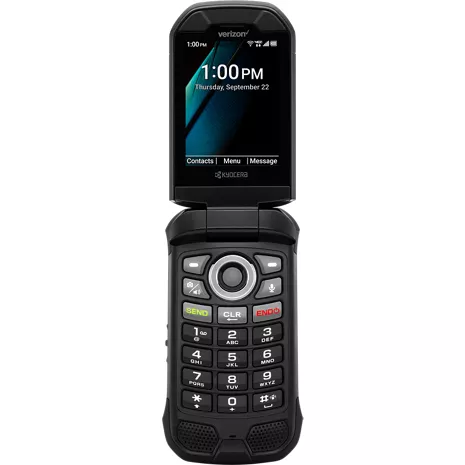
Kyocera DuraXV Extreme+ Prepaid sin cámara
2.7
15 indefinido
50
besat phone ever
awsome . 5 months
Good phone
Danig4ever . 1 year
- Clasificación de resistencia al agua y al polvo IP68 de hasta 30 minutos en aguas de hasta 6.5 pies de profundidad. Resistente a caídas de hasta 1.5 m sobre concreto.
- SOS y PTT requieren suscripción.

Comunicación confiable.

Diseñado para entornos demandantes.

Fácil de usar.

Compacto y confiable.
Comunicación confiable.
Diseñado para entornos demandantes.
Diseño
Profundidad
1.07 pulgadas
Color
Negro
Ancho
2.22 pulgadas
Largo
4.36 pulgadas
Altura
4.36 pulgadas
Puerto de carga
USB tipo C / USB de alta velocidad 2.0
Certificaciones ecológicas
Diseño ecológico
Peso
6.8 onzas
Materiales notables
Flip
Accesibilidad
Auditivo
Lectura, velocidad de voz y tono de voz, alertas persistentes, subtítulos, audio mono, balance de sonido, texto en tiempo real, vibrar para llamadas/alertas/alarmas, control de volumen, flash LED para alertas
Movilidad
Comando de voz, vibrar para llamadas/alertas/alarmas, intensidad de vibración, alertas persistentes, teclas físicas, teclas programables
HAC
M4/T4, dispositivos auditivos/modo Telecoil
Visual
Lectura, velocidad de voz y tono de voz, tamaño de fuente, inversión de color, corrección de color, vibrar para llamadas/alertas/alarmas, intensidad de vibración, nivel de brillo, golpecitos táctiles en el número de tecla "5" del teclado, guía del usuario de Braille disponible a solicitud
Batería
Tiempo máximo de inactividad
420 horas
mAh (por hora)
1770 mAh (extraíble)
Tiempo de uso
56.08 horas
PasaCarga
No
Carga rápida
No
Carga inalámbrica
No
red
4G
UMTS: B5, B2, B1 (850, 1900, 2100MHz) LTE, Categoría 4: B12, B13, B5, B4, B2 (700a, 700c, 850, 1700, 1900MHz)
Wi-Fi
Sí, MT6631N 802.11 a/b/g/n/r/k/ac (2.4 y 5 GHz)
SAR
Cabeza: 0.75 W/kg | Cuerpo: 1.13 W/kg (a 0.59 pulgadas, 1.5 cm) | Hotspot: 1.16 W/kg
Red de roaming y global
Sí
FCC ID
V65E4811
Dispositivo World
No
Rendimiento
Bluetooth
BT 5.1 +LE/EDR
Procesador
MediaTek MT6761V/WB 2.0 GHz x 3 núcleos A53
SO
Android Q (AOSP)
Memoria expandible
Sí | microSDXC hasta 512 GB
Memoria/almacenamiento
2 GB/16 GB
Hotspot
Sí (2.4 GHz), <10 devices>
Pantalla
Tamaño de pantalla
Principal: 2.6 pulgadas | Sub: 1.08 pulgadas
Frecuencia de actualización
Principal: 60 Hz | Sub: 60 Hz
Tipo de pantalla
Principal: TFT LCD | Sub: OLED monocromático
Relación de aspecto
Principal: 320 x 240 (4:3) | Sub: 102 x 90
KYOE4811NC
- DuraXV Extreme+
- Tarjeta SIM preinstalada
- Adaptador de CA
- Batería de iones de litio (desmontable)
- Cable USB tipo C
- Folletos
- Clasificación de resistencia al agua y al polvo IP68 de hasta 30 minutos en aguas de hasta 6.5 pies de profundidad. Resistente a caídas de hasta 1.5 m sobre concreto.
- SOS y PTT requieren suscripción.
Kyocera DuraXV Extreme+ Non Camera Prepaid undefined
2.7
15 undefined
50
besat phone ever
awsome . 5 months
This series of phone has been a workhorse for me for many years!
Ken Yy . 1 year
Kyocera Customer Support - 1 year
Kyocera Mobile is happy to support personal and business privacy requirements with our ultra-rugged, easy-to-use, non-camera, TAA-compliant flip phones. Thanks for your purchase. We appreciate your positive review!
Died after 13 months, - 1 month after warranty expired
myself1 . 2 years
Kyocera Customer Support - 2 years
We're sorry to hear about the troubles you have had with your phone and battery. If you did not purchase your replacement battery from Kyocera's online Solutions Store, you probably did not get an authentic battery, which would explain why it did not solve the problem. Additionally, DuraXV Extreme+ comes with Kyocera’s Standard 2-Year Manufacturer’s Warranty, not a one-year warranty. Please contact our customer support team at 1-800-349-4478, or online at kyoceramobile.com/contactus/support/, to describe the problem and they will assist you. When you contact them, please have your phone's IMEI ready to provide to them.
Keeps me humble and alive…
JPoon6869 . 2 years
Not good for older people
Yes sir . 2 years
Kyocera Customer Support - 2 years
Thank you for your feedback on DuraXV Extreme+. Here are a couple of tips that might help you make calls faster. First, you can get to the Contacts list quickly from the home screen by pressing the left softkey (in the upper left corner of the keypad). This will open the Contacts list and you can scroll to the contact or start entering the letters of the name to narrow the list. Second, for people you want to call quickly, you can add their contact to the Speed Dial list. To do this: 1) Go to Settings::Call settings::Speed dial setup. 2) Press the left softkey to add a speed dial entry. 3) Enter the speed dial number which is the number you want to press in order to call that person. (The number 1 is already reserved for voicemail.) 4) Press the left softkey to set the contact name. 5) Select the contact from the list and press the center navigation key to choose that one. 5) Press the center navigation key again to save the speed dial entry. 6) Press the End key to return to the home screen. After this, when you are on the home screen, you can press and hold the number key for the speed dial number of the person you want to call. For example, you would press and hold 3 to call the contact in speed dial 3. For speed dial 12, you would press 1, then press and hold 2. For more tips about your phone or to get a copy of the user guide, contact our customer support team at 1-800-349-4478.
Kyocera DuraXV Extreme+ sin cámara Prepaid sin definir
Beardown . Mar 7, 2026
Does it support parental locks to turn off or restrict internet and apps?
DuraXV Extreme+ comes with a feature called Device Control which can be used to hide apps like the browser and email, and to disable data access. This may meet your needs if you are technically savvy and have some time to configure the phone. The feature can be found under Settings&tools->Business tools->Device Control. Here is a link to information about how to use this Device Control feature. The "How To" guide includes an example called "How to Hide unwanted Apps." kyoceramobile.com/device-control/feature-phones
John . Mar 3, 2026
I'd like this with no camera, no texting and no internet. IIs this possible?
DuraXV Extreme+ Non-Camera (E4811NC) does not have a camera and it comes with a feature called Device Control which can be used to hide apps like the browser and email, and to disable data access. This may meet your needs if you are technically savvy and have some time to configure the phone. The feature can be found under Settings&tools->Business tools->Device Control. Here is a link to information about how to use this Device Control feature. The "How To" guide includes an example called "How to Hide unwanted Apps." kyoceramobile.com/device-control/feature-phones
curtis Nile . Oct 8, 2025
Does this phone have talk to text....
DuraXV Extreme+ does not have built-in support for talk-to-text. However, some users have reported in online forums that they have been able to sideload the "Voice Access" app by Google and successfully used that for talk-to-text.
Josh . Jun 23, 2025
Does it have wifi calling?
Purple . May 25, 2025
Does it have Internet app?
Yes, DuraXV Extreme+ does provide internet connectivity via a built-in browser. It can, however, be disabled if required.