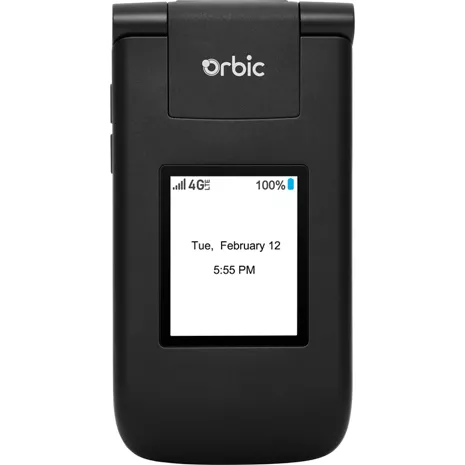
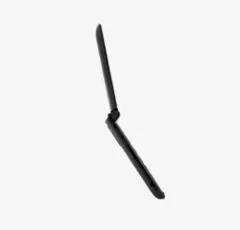
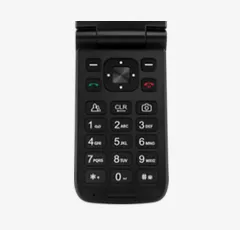
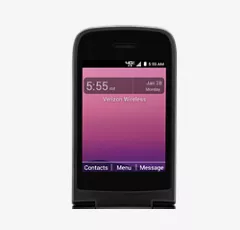
I got one of these Orbic Journey V phones for free (the price and the discount were the same) as part of the TracFone acquisition by Verizon back in 2022. The phone reminds me of the older Motorola V3xx, but the software design is much(!) less polished and quite buggy. I've used it for two years as a back-up phone and audio streaming receiver and it works possibly well for both roles as I use it. Even though by most standards this isn't a very good phone, it's been quite good for me the way I use it.
The Good:
---------
The phone actually works quite reliably for phone calls and simple messaging. This is a fantastic back-up phone with excellent battery life on standby and about four to five hours talk time - the specs say seven hours, maybe under ideal conditions that don't happen in the real world, expect about four hours). It reliably sends and receive text messages, including internet links, but can't send or receive photos or other media in the text message. It's like texting was 20 years ago. It plays YouTube videos, including full screen. The audio "Media Player" app plays MP3 media superbly and can organize the audio files by artist and one can create and run playlists. It can also play MP3s in random order ("shuffling"). The "Media Player" also can benefit from additional audio effects like reverb and an equalizer (which like everything else is quirky and underfeatured, but does work). The phone comes with a single 2 megapixel fixed-focus camera, which is very similar to cameras 20 to 25 years ago. While most modern users may be disappointed with it, those who want the photographic character (lack of color accuracy and definition) of the old cameras will be extremely pleased (which includes me -- I've got modern cameras on the main phones, but if I want an "old fashioned" cell phone photo, the Orbic is absolutely excellent for this, and why this feature is in this "Good" and "Interesting" sections of my review here). Also, unlike the modern cameras and like the old cameras, the Orbic's camera can see infrared light. The "Contacts", "Messages" and "Notifications" functions work minimally, but reliably.
Also, the Orbic Journey V is what in 2022 and 2024 would be called a "dumb phone". They're actually much smarter and much better featured than the actual real "dumb phones" of 30 to 40 years ago, but this is not a smartphone. That also means it's not constantly hyperactively updating itself with software and messages. If you're not doing very much, it's not doing very much either. This greatly helps battery life. Also, the only "social media" is text messaging, just like 20 to 25 years ago.
Also, the phone has GPS receiver functions, which work with the phone's E911 functions. When calling 911, and if requested by a website (with the user's approval) the phone can relay its actual geolocation to 911 if it can "see" the sky.
The Interesting:
----------------
While the pre-installed utility and application software is minimal and quirky/buggy (like what you'd see in the Motorola V3 20 years ago but with more bugs, the V3 series had much more solid software than the Orbic J5), they are usable in a minimal way. There are no apps available and apps cannot be added, so the functions that come with the phone are all it's going to have. The calendar and calculator work well but very minimally. The browser is actually useful for some things and seems to run a subset of modern HTML5, and in many cases it can play videos, including YouTube videos (which it does quite well on it's little screen). It also does quite well with audio streams The camera is 2 megapixels, but acts like cameras from 20 years ago with fuzziness and washed out colors and artifacting. This also has advantages if these are effects you want -- I like it because it is an "old" camera in ways modern cameras can't replicate. Also, being an "old" camera, it can see infrared light, very useful when testing infrared remotes). Sometimes, if the camera function is enabled, one can close the clamshell and the camera's view will sometimes display on the outside small screen (but this function isn't reliable -- sometimes it does display, sometimes it doesn't). Also, the software is underfeatured. One can easily and reliably add wallpaper to the main screen, but can't add any wallpaper to the small outside display -- it is always bright white. Also the brightness cannot be adjusted, with the unintended bonus it makes a nice little night light or kinda-sorta flashlight at night.
Also, the phone has GPS receiver functions, which work with the phone's E911 functions and websites (with the user's approval). However, you as a user are not allowed direct access to the phone's GPS functions -- the phone can tell 911 and a website it's actual geolocation, but won't ever tell you as the user with the apps available.
The Bad:
--------
The case is made from a soft matte black plastic that scratches easily. It you use the phone the way normal flip phones are normally used in the real world, the case will likely quickly get scuffed and scratched up. It's not a physically durable phone -- it will break if carried, banged around, and flipped open and closed in typical tool-like real-world use.
The app software seems to be written by people who don't speak English as a first language and aren't conscientious about the software design and development. While using it numerous glitches can occur (like auto-switching between the internal speaker and the headphones -- it's sometimes laggy and occasionally doesn't happen on the plug-in event. Also, one cancel button is captioned "Cancle", and sometimes when running a stream it will stop the stream and go to sleep even though it's plugged into main power and the clamshell is open. Other times it may stop the stream and present a dialog asking the user if the website's request for the phone's location should be allowed. One minor annoyance is when changing the volume, it will bring up very large dialogs, then another dialog indicating the volume has been set. It doesn't need to make such a big visual production about adjusting the volume. Also, in some cases there is more than one volume control, the Media Player volume and master volume, Occasionally this can get confusing why the "Media Player" volume is set to maximum yet there's no audio (because the master volume is set to zero).
Also, the main lithium battery will unrecoverably swell after about 18 months to two years, and if allowed to remain in the phone will deform the internal electronics and keypad upward. Also as the battery continues to swell, the case back won't pop off but will become increasingly difficult to open/remove. Likely if allowed to remain in the phone the swelling battery may mechanically break the internal electronic assemblies.
Conclusion:
-----------
I like this phone a lot for what I use it for (a back up phone and audio streamer into a speaker), I use it a lot for this and in those roles it works very well. However, it's not for everyone. Also it is comparatively buggy, underfeatured, and fragile in hard real-world use. It is what it is.