Google Pixel Watch 2, prepagado
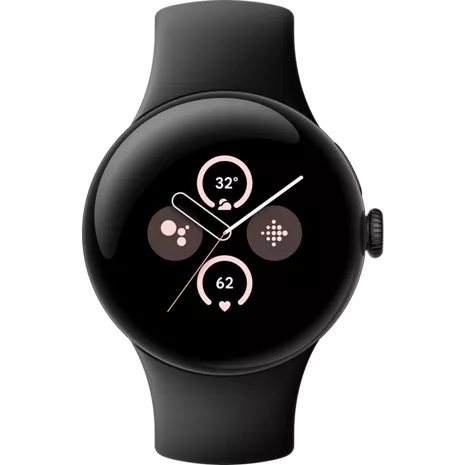
4.1
146 indefinido
51
Don't get this, get pixel watch 4
So many androids . 4 months
Google Team - 4 months
Hey there. We hear your concerns about battery life on the Pixel watch 2 — here are some tips to reduce battery consumption and get more daily use out of your watch:Shorten the screen timeout: Swipe down, tap Settings > Display > Screen timeout, and choose a shorter time, like 15 seconds. This means your watch goes to sleep more frequently when you're not using it.
Turn off Always-on Display: Swipe down and then tap Settings. Tap Display and then turn off "Always-on Display".
Turn off the Tilt-to-wake feature: Swipe down and then tap Settings. Tap Gestures and then turn off "Tilt-to-wake".
If you need any more help, reach out to us anytime here: https://support.google.com/googlepixelwatch/gethelp?sjid=1168929876280557452-NC

Died after one year
Jtb1 . 8 months
Google Team - 8 months
Hey there, Jtb1. Sorry you ran into inconsistent step counting on the Pixel Watch 2. Improve accuracy by checking your height and wrist settings in the Fitbit app — you may need to manually adjust stride length. For charging, align the crown with the cable, ensuring the 4 pins meet the watch contacts. Reach out to us if you need any help: https://support.google.com/googlepixelwatch/gethelp?sjid=1168929876280557452-NC
- Funciona con la mayoría de los teléfonos con Android 9.0 o versiones posteriores. Requiere una cuenta de Google y la aplicación Google Pixel Watch y acceso a internet. Algunas funciones requieren una cuenta de Fitbit y una aplicación móvil y/o una suscripción de pago. Las aplicaciones y los servicios de Google no están disponibles en todos los países o idiomas. Visita g.co/pixelwatch/specs para ver las especificaciones técnicas y del dispositivo.
- Algunas funciones pueden requerir la aplicación Fitbit. La precisión del seguimiento de la frecuencia cardiaca puede verse afectada por la fisiología, la ubicación del dispositivo, y tus movimientos y actividad.
- Algunas aplicaciones y servicios de Google requieren LTE o un teléfono emparejado dentro del alcance Bluetooth de tu dispositivo y no están disponibles en todos los países o idiomas. Pueden aplicarse tarifas de datos.
- Las funciones de protección personal dependen de la conexión de la red y de otros factores, y podrían no ser confiables para las comunicaciones de emergencia o no estar disponibles en todos los países o idiomas. Visita g.co/pixelwatch/personalsafety para obtener más información.
- Comparado con el Google Pixel Watch (1.ª gen.).
- No disponible en todos los países. Los cambios significativos en la temperatura ambiente pueden afectar negativamente a la monitorización de la temperatura cutánea.
- El aluminio reciclado corresponde al menos al 3% del producto basado en el peso.
- Comparado con el Google Pixel Watch (1.ª gen.) usando una pantalla siempre activa. La duración máxima de la batería es aproximada y se basa en pruebas realizadas con versiones de hardware y software de preproducción, con los ajustes predeterminados y el perfil de uso mediano de la batería de un usuario de Pixel, combinando llamadas, uso de datos, tiempo en espera y otras funciones. La duración de la batería depende de las funciones habilitadas, el uso, el entorno y muchos otros factores. El uso de algunas funciones determinadas disminuirá la duración de la batería. La duración real de la batería puede ser menor.
- Algunas funciones requieren la aplicación móvil Fitbit.
- La aplicación ECG y las notificaciones de ritmo cardiaco irregular solo están disponibles en algunos países. Su uso no está indicado en menores de 22 años o en personas con algún tipo de arritmia diagnosticada. Los datos de ritmo cardiaco irregular solo se registran cuando el usuario está quieto o durmiendo. Visita fitbit.com/ec o fitbit.com/irregularrhythm para obtener más información.
- No disponible en todos los países. La función SpO2 no está diseñada para diagnosticar o tratar ninguna afección médica ni ningún otro propósito médico. Tiene como fin ayudarte a administrar tu bienestar y llevar un registro de tu información.
- Pueden aplicarse tarifas de datos. Comprobación de seguridad requiere tener la ubicación activada y el servicio 4G LTE o una conexión a internet. Comprobación de seguridad depende de la conexión de la red y de otros factores, y podría no ser confiable para comunicaciones de emergencia o no estar disponible en todas las zonas o idiomas. Visita g.co/pixelwatch/personalsafety para obtener más información.
- Pueden aplicarse tarifas de datos. Aviso de emergencia requiere tener la ubicación activada y el servicio 4G LTE o una conexión a internet. Aviso de emergencia depende de la conexión de la red y de otros factores, y podría no ser confiable para comunicaciones de emergencia o no estar disponible en todas las zonas o idiomas. Visita g.co/pixelwatch/personalsafety para obtener más información. 14 Detección de caídas no está disponible en todos los países y depende de la conectividad de la red y de otros factores. El reloj podría no ser confiable para realizar comunicaciones de emergencia. Puede que Detección de caídas no detecte todas las caídas. Para llamar a los servicios de emergencias con la versión de Google Pixel Watch sin 4G LTE, el teléfono al que esté emparejado debe estar cerca. Los usuarios deben conceder el permiso de ubicación para que Detección de caídas comparta la ubicación externamente. Pueden aplicarse tarifas de datos. Visita g.co/pixelwatch/personalsafety para obtener más información.
- Emergencia SOS requiere ubicación activada y servicio 4G LTE o una conexión a internet. Emergencia SOS depende de la conexión de la red y de otros factores, y podría no ser confiable para las comunicaciones de emergencia o no estar disponible en todos los países o idiomas. Visita g.co/pixelwatch/personalsafety para obtener más información.
- El Asistente de Google y algunas funciones relacionadas no están disponibles en todos los idiomas. Visita g.co/assistant/languages para obtener información actualizada sobre la disponibilidad de idiomas.
- El teléfono, los Pixel Buds y la Pixel Tablet se venden por separado. Para la función Fast Pair se debe activar la ubicación.
- Requiere la aplicación Google Fotos.
- La Detección de accidentes de auto en los teléfonos Pixel y la Detección de caídas en el Pixel Watch no están disponibles en todos los idiomas o países y es posible que no detecten todos los accidentes de auto o caídas. Ambas funciones dependen de la conexión de la red y de otros factores, y podrían no ser confiables para las comunicaciones de emergencia o no estar disponibles en todas las zonas. Para llamar a los servicios de emergencia en una versión Wi-Fi del Google Pixel Watch (no 4G LTE), el teléfono emparejado debe estar cerca. En la Detección de accidentes de auto, las actividades de alto impacto podrían activar llamadas a los servicios de emergencia. Visita g.co/pixelwatch/personalsafety para obtener más información.

Los dispositivos Pixel son aún mejores juntos.
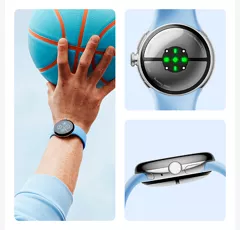
Un diseño más liviano y refinado.
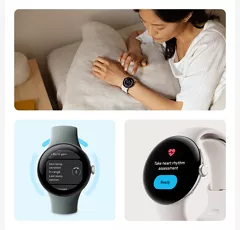
Descubre más sobre tu salud.
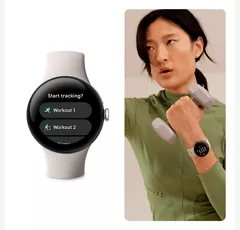
Alcanza tus objetivos de entrenamiento con ayuda en tiempo real.
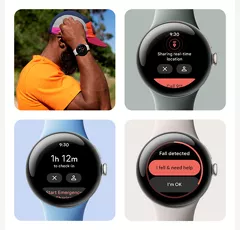
Obtén ayuda ante una emergencia.

Sigue encaminado y haz tus actividades.
Los dispositivos Pixel son aún mejores juntos.
Un diseño más liviano y refinado.
Diseño
Correas para relojes
Correa deportiva perforada: incluye tamaños de correa pequeña y grande. El tamaño pequeño se ajusta a muñecas de 130 a 175 mm de circunferencia. El tamaño grande se ajusta a muñecas de 165 a 210 mm de circunferencia.
Acabados
Correa deportiva perforada: fluoroelastómero con revestimiento pulido
Colores
Verde liquen | Obsidiana | Porcelana | Celeste
Altura
0.48 pulgadas
Ancho
41 mm de diámetro (1.61”)
Materiales notables
Caja: aluminio 100% reciclado
Peso
1.09 onzas
Puerto de carga
Cable para cargar rápido USB-C®
Accesibilidad
Auditivo
Micrófono integrado | Altavoz integrado
Asistente de voz
Asistente de Google, Gemini
Batería
mAh (por hora)
306 mAh (típico)
Tiempo de uso
20.96 horas
red
4G
2,4,5,12,13,66
Wi-Fi
Wi-Fi 802.11 a/b/g/n 2.4 GHz
SAR
1.6 W/kg
Elegible para Number Share
Sí
FCC ID
A4RGD2WG
Dispositivo World
No
Rendimiento
Procesador
Qualcomm 5100 | Coprocesador Cortex M33
SO
Wear OS 4.0
Memoria/almacenamiento
Flash eMMC de 32 GB | 2 GB de SDRAM
Pantalla
Tipo
Cristal personalizado 3D Corning® Gorilla® Glass 5 | Pantalla AMOLED de 320 ppp con espacio de color DCI-P3 | Aumento de brillo hasta 1000 nits | Pantalla siempre activa
Tamaño
41 mm
GA05013-US
- Google Pixel Watch 2
- Correa activa (correa pequeña y grande)
- Cable para cargar magnético USB-C®
- Guía de inicio rápido
- Funciona con la mayoría de los teléfonos con Android 9.0 o versiones posteriores. Requiere una cuenta de Google y la aplicación Google Pixel Watch y acceso a internet. Algunas funciones requieren una cuenta de Fitbit y una aplicación móvil y/o una suscripción de pago. Las aplicaciones y los servicios de Google no están disponibles en todos los países o idiomas. Visita g.co/pixelwatch/specs para ver las especificaciones técnicas y del dispositivo.
- Algunas funciones pueden requerir la aplicación Fitbit. La precisión del seguimiento de la frecuencia cardiaca puede verse afectada por la fisiología, la ubicación del dispositivo, y tus movimientos y actividad.
- Algunas aplicaciones y servicios de Google requieren LTE o un teléfono emparejado dentro del alcance Bluetooth de tu dispositivo y no están disponibles en todos los países o idiomas. Pueden aplicarse tarifas de datos.
- Las funciones de protección personal dependen de la conexión de la red y de otros factores, y podrían no ser confiables para las comunicaciones de emergencia o no estar disponibles en todos los países o idiomas. Visita g.co/pixelwatch/personalsafety para obtener más información.
- Comparado con el Google Pixel Watch (1.ª gen.).
- No disponible en todos los países. Los cambios significativos en la temperatura ambiente pueden afectar negativamente a la monitorización de la temperatura cutánea.
- El aluminio reciclado corresponde al menos al 3% del producto basado en el peso.
- Comparado con el Google Pixel Watch (1.ª gen.) usando una pantalla siempre activa. La duración máxima de la batería es aproximada y se basa en pruebas realizadas con versiones de hardware y software de preproducción, con los ajustes predeterminados y el perfil de uso mediano de la batería de un usuario de Pixel, combinando llamadas, uso de datos, tiempo en espera y otras funciones. La duración de la batería depende de las funciones habilitadas, el uso, el entorno y muchos otros factores. El uso de algunas funciones determinadas disminuirá la duración de la batería. La duración real de la batería puede ser menor.
- Algunas funciones requieren la aplicación móvil Fitbit.
- La aplicación ECG y las notificaciones de ritmo cardiaco irregular solo están disponibles en algunos países. Su uso no está indicado en menores de 22 años o en personas con algún tipo de arritmia diagnosticada. Los datos de ritmo cardiaco irregular solo se registran cuando el usuario está quieto o durmiendo. Visita fitbit.com/ec o fitbit.com/irregularrhythm para obtener más información.
- No disponible en todos los países. La función SpO2 no está diseñada para diagnosticar o tratar ninguna afección médica ni ningún otro propósito médico. Tiene como fin ayudarte a administrar tu bienestar y llevar un registro de tu información.
- Pueden aplicarse tarifas de datos. Comprobación de seguridad requiere tener la ubicación activada y el servicio 4G LTE o una conexión a internet. Comprobación de seguridad depende de la conexión de la red y de otros factores, y podría no ser confiable para comunicaciones de emergencia o no estar disponible en todas las zonas o idiomas. Visita g.co/pixelwatch/personalsafety para obtener más información.
- Pueden aplicarse tarifas de datos. Aviso de emergencia requiere tener la ubicación activada y el servicio 4G LTE o una conexión a internet. Aviso de emergencia depende de la conexión de la red y de otros factores, y podría no ser confiable para comunicaciones de emergencia o no estar disponible en todas las zonas o idiomas. Visita g.co/pixelwatch/personalsafety para obtener más información. 14 Detección de caídas no está disponible en todos los países y depende de la conectividad de la red y de otros factores. El reloj podría no ser confiable para realizar comunicaciones de emergencia. Puede que Detección de caídas no detecte todas las caídas. Para llamar a los servicios de emergencias con la versión de Google Pixel Watch sin 4G LTE, el teléfono al que esté emparejado debe estar cerca. Los usuarios deben conceder el permiso de ubicación para que Detección de caídas comparta la ubicación externamente. Pueden aplicarse tarifas de datos. Visita g.co/pixelwatch/personalsafety para obtener más información.
- Emergencia SOS requiere ubicación activada y servicio 4G LTE o una conexión a internet. Emergencia SOS depende de la conexión de la red y de otros factores, y podría no ser confiable para las comunicaciones de emergencia o no estar disponible en todos los países o idiomas. Visita g.co/pixelwatch/personalsafety para obtener más información.
- El Asistente de Google y algunas funciones relacionadas no están disponibles en todos los idiomas. Visita g.co/assistant/languages para obtener información actualizada sobre la disponibilidad de idiomas.
- El teléfono, los Pixel Buds y la Pixel Tablet se venden por separado. Para la función Fast Pair se debe activar la ubicación.
- Requiere la aplicación Google Fotos.
- La Detección de accidentes de auto en los teléfonos Pixel y la Detección de caídas en el Pixel Watch no están disponibles en todos los idiomas o países y es posible que no detecten todos los accidentes de auto o caídas. Ambas funciones dependen de la conexión de la red y de otros factores, y podrían no ser confiables para las comunicaciones de emergencia o no estar disponibles en todas las zonas. Para llamar a los servicios de emergencia en una versión Wi-Fi del Google Pixel Watch (no 4G LTE), el teléfono emparejado debe estar cerca. En la Detección de accidentes de auto, las actividades de alto impacto podrían activar llamadas a los servicios de emergencia. Visita g.co/pixelwatch/personalsafety para obtener más información.
Google Pixel Watch 2 Prepaid undefined
4.1
146 undefined
51
Don't get this, get pixel watch 4
So many androids . 4 months
Google Team - 4 months
Hey there. We hear your concerns about battery life on the Pixel watch 2 — here are some tips to reduce battery consumption and get more daily use out of your watch:Shorten the screen timeout: Swipe down, tap Settings > Display > Screen timeout, and choose a shorter time, like 15 seconds. This means your watch goes to sleep more frequently when you're not using it.
Turn off Always-on Display: Swipe down and then tap Settings. Tap Display and then turn off "Always-on Display".
Turn off the Tilt-to-wake feature: Swipe down and then tap Settings. Tap Gestures and then turn off "Tilt-to-wake".
If you need any more help, reach out to us anytime here: https://support.google.com/googlepixelwatch/gethelp?sjid=1168929876280557452-NC
Died after one year
Jtb1 . 8 months
Google Team - 8 months
Hey there, Jtb1. Sorry you ran into inconsistent step counting on the Pixel Watch 2. Improve accuracy by checking your height and wrist settings in the Fitbit app — you may need to manually adjust stride length. For charging, align the crown with the cable, ensuring the 4 pins meet the watch contacts. Reach out to us if you need any help: https://support.google.com/googlepixelwatch/gethelp?sjid=1168929876280557452-NC
Granny
Suzanne . 11 months
Pixel Watch 2
E Miller . 11 months
Watch
Sheila . 11 months
So far I love it!!
FlLisa . 1 year
no customer service
screwfitbit . 1 year
Google Team - 1 year
Hey there. We’re sorry your experience with the Pixel Watch 2 hasn’t been the best. We’d be happy to help support you with what you need. Reach out to us anytime here: https://support.google.com/googlepixelwatch/gethelp?sjid=1168929876280557452-NC
Pixel Watch 2
Dan S . 1 year
Skip this one
Egreg . 1 year
Google Team - 1 year
Hey there, Egreg. We’re happy you’re enjoying the design and taking advantage of all the features. That said, we hear your concern about battery life. Here are some tips to reduce battery consumption:Shorten the screen timeout: Swipe down, tap Settings > Display > Screen timeout, and choose a shorter time, like 15 seconds. This means your watch goes to sleep more frequently when you're not using it.
Turn off Always-on Display: Swipe down, tap Settings > Display > turn off "Always-on Display".
Turn off the Tilt-to-wake feature: Swipe down, tap Settings > Gestures > turn off "Tilt-to-wake".
Reach out to us if you need any more help.
Google Pixel Watch 2 Prepaid undefined
Phone Brand Usage . Dec 15, 2025
Can it be used with a Samsung phone?
Hey there. The Pixel Watch 2 can be used with phones running Android OS version 9.0 or newer. Check out this link for more details: https://support.google.com/googlepixelwatch/answer/12652073?hl=en
Google Pixel Watch 2 . Sep 4, 2025
Can you receive and respond to text messages from the watch?
Thanks for the inquiry. Yes, You can make calls and send text messages from the Pixel Watch 3. Just stay connected with Wi-Fi and keep your phone close for calls and texts. Check out this guide for more information: https://support.google.com/googlepixelwatch/gethelp?sjid=1168929876280557452-NC
Water proof . Aug 11, 2025
Is this watch water proof
We appreciate the inquiry. The Pixel Watch 2 has a water resistance rating of 50 meters, meaning you can take it swimming with you and have it track your sessions. Here’s a link with more information: https://support.google.com/fitbit/answer/14237015
Water proof . Aug 11, 2025
Is this watch water proof
We appreciate the inquiry. The Pixel Watch 2 has a water resistance rating of 50 meters, meaning you can take it swimming with you and have it track your sessions. Here’s a link with more information: https://support.google.com/fitbit/answer/14237015
Google Pixel Watch 2 is not waterproof, but it is water-resistant up to 50 meters (5 ATM). This means it can withstand being submerged in water to that depth, making it suitable for activities like swimming and showering. However, it's not recommended for high-velocity water activities like water skiing or scuba diving.
Carsar . Jul 22, 2025
Can it be used with iPhone
Hi there, Caesar. Unfortunately, the Pixel Watch 2 isn’t compatible with any iOS devices. Here's a link with more details: https://support.google.com/googlepixelwatch/answer/12652073
Pixel 9 Pro XL 2 . Jun 29, 2025
What is the slot on the left side of the watch for?
Thanks for asking. The left side of the Pixel Watch 2 houses the speaker and microphone for voice commands and phone calls. Here’s a guide with more details: https://support.google.com/googlepixelwatch/answer/12651780
The left slot on the Pixel Watch 2, particularly the small hole located to the left of the speaker, is the microphone. There is also a debug slot which involves gold pins within the watch band slot, and poking this can potentially damage the watch. If you are referring to the area where the watch band attaches, that is the band attachment port. If you are referring to the entire box the Pixel Watch 2 comes in, the left side typically contains the charger. For more questions, contact Verizon Customer Service at 800-922-0204 or Online Support at: https://espanol.verizon.com/support/contact-us/ -Ross
Vibration alarm . Oct 15, 2024
Does this have the vibration alarm like the fitbits
Hi there. Yes, the Google Pixel Watch 2 has a vibration alarm that can be turned on or off for each alarm. You can also adjust the volume settings for the vibration. Here's how you can manage alarms and notifications: On your Google Pixel Watch, press the side button next to the crown.Swipe up to view all apps.Tap Alarm.Tap Add.Set a time and then tap Confirm.Once your alarm has been created, it will be visible on the alarm screen.
Google Pixel Watch . Sep 29, 2024
what is the warranty?
Hi there, the warranty for the Pixel Watch 2 is for 1 year for the US. To find more details about warranty and technical specs for the Pixel Watch 2, take a look at this article: https://support.google.com/googlepixelwatch/answer/12651869?hl=en#zippy=%2Cgoogle-pixel-watch-specifications
Dave . Aug 11, 2024
I want my watch connected to my phone. What do u need to do?
For help troubleshooting your device, you can contact customer service here: https://espanol.verizon.com/support/contact-us/ ~Freddy
Great question, Dave! Here is an article that guides you through the entire process of setting up your Google Pixel Watch 2 with your phone: https://support.google.com/googlepixelwatch/answer/12651780?hl=en The article also includes troubleshooting steps in case the pairing fails. At the end, you'll find a button to contact us for further assistance.
Mario . Aug 4, 2024
If I have an Apple phone can I get a google pixel watch to pair