Altavoz Bluetooth portátil JBL para el Boombox3
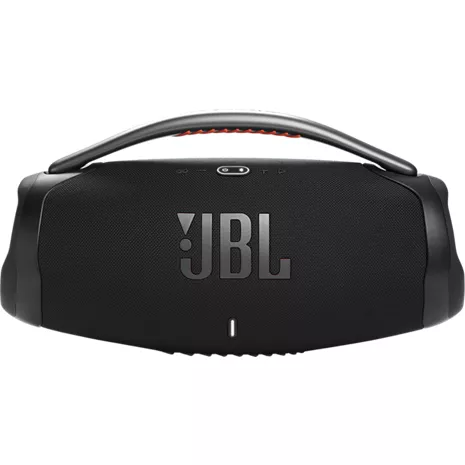
Color
Precio
$499.99
$41.67/mo with 12 months financing exclusively with Verizon Visa® Card.
Details
Cantidad
Disponible solo en línea.
Devoluciones gratis dentro de los 30 días.Detalles
Obtenlo rápido
Envío gratis en 2 días
PartyBoost.
Empareja 2 altavoces compatibles con JBL PartyBoost para disfrutar de un sonido estéreo. Incluso puedes emparejar varios altavoces para obtener un sonido arrollador y envolvente.
Logra más con la aplicación.
Usa la aplicación JBL Portable para sacar el máximo partido a tu altavoz. Personaliza los ajustes, desbloquea las funciones y obtén actualizaciones en tiempo real para que siempre puedas escuchar tu música a tu manera.
Empaque ecológico.
Diseñado para ser sostenible, el Boombox 3 se vende en una caja de papel reciclable, que incluye la bandeja interior, y el exterior está impreso con tinta de soja.
¹ Clasificación de impermeabilidad IP67. Se puede sumergir en agua hasta 1 m durante un máximo de 30 minutos.
² La duración de la batería y los ciclos de carga varían según el uso, la configuración y otros factores; los resultados reales podrían variar.
Reseñas
4.5
126 reseñas
100 % de las reseñas recomiendan este producto.
Great sound
John Dangelo . 2 months ago
jbl.com Originally posted on jbl.com
Totally awesome
Bdread55 . 2 months ago
jbl.com Originally posted on jbl.com
Características
- Sonido arrollador y graves profundos
- Hasta 24 horas de reproducción²
- Resistencia al polvo y al agua IP67²¹
- Diseño llamativo y resistente
- Streaming Bluetooth inalámbrico
- Compatible con PartyBoost
- Aplicación JBL Portable
- Empaque reciclable
Especificaciones
- Dimensiones: 19.0 x 7.9 x 10.1 pulgadas
- Peso: 235 oz
- Transductores: subwoofer de 189 x 114 mm, 2 de rango medio de 80,9 x 80,9 mm/2 de 2,75 pulgadas, 2 tweeters de 20 mm/2 de 0,75 pulgadas
- Potencia de salida: 1 de subwoofer RMS de 80 W + 2 de frecuencia media RMS de 40 W + 2 de tweeter RMS de 10 W (modo de CA) 1 de subwoofer RMS de 60 W + 2 de frecuencia media RMS de 30 W + 2 de tweeter RMS de 8 W (modo batería)
- Entrada de energía: 100-240 Vac; 50/60 Hz
- Respuesta de frecuencia: 40 Hz – 20 kHz
- Relación señal-ruido: >80dB
- Tipo de batería: polímero de iones de litio 72.6 Wh
- Tiempo de carga de la batería: 6.5 horas
- Tiempo de reproducción de música: hasta 24 horas
- Puertos de conexión: AC-in, USB-A, Aux-in
- Tipo de cable: cable de alimentación de CA
- Largo del cable: 2000 mm/78.7"
- Salida de carga USB: 5 V/2.0 A (máximo)
- Versión de Bluetooth®: 5.3
- Perfil Bluetooth®: A2DP 1.3, AVRCP 1.6
SKU Nº
SKU Nº
JBLBOOMBOX3BLKAM
En la caja
- JBL Altavoz portátil Boombox 3
- Cable de alimentación de CA
- Guía de inicio rápido
- Hoja de seguridad
- Tarjeta de garantía
Reseñas de JBL altavoz Bluetooth portátil para el Boombox3
4.5
126 reseñas
100 % de las reseñas recomiendan este producto.
Great sound
John Dangelo . 2 months ago
jbl.com Originally posted on jbl.com
Totally awesome
Bdread55 . 2 months ago
jbl.com Originally posted on jbl.com
Disappointed
Gmoore . 2 months ago
Customer Support - 2 months ago
Thanks for your feedback. We appreciate your input and we'll make sure to forward it to the appropriate team.jbl.com Originally posted on jbl.com
I'm Impressed, Overall Sound Quality is Great
CoastieKarl . 2 months ago
jbl.com Originally posted on jbl.com
Stanthrill . 3 months ago
jbl.com Originally posted on jbl.com
Battery lasts FOREVER!!!
cindyangel . 3 months ago
jbl.com Originally posted on jbl.com
Mind blowing!!!
Taylor King . 3 months ago
jbl.com Originally posted on jbl.com
Loud sound
Getskinny1 . 4 months ago
jbl.com Originally posted on jbl.com
In love with my new boombox 3!
Pabs7 . 4 months ago
jbl.com Originally posted on jbl.com
JBL puts the BOOM in Boombox3
BlindGeek007 . 4 months ago
jbl.com Originally posted on jbl.com
JBL Boombox3 Portable Bluetooth Speaker FAQs
Bdp123 . Feb 6, 2026
Can I link a microphone to this product?
Thanks for your question. Unfortunately, our JBL Boombox 3 does not support microphone input.
Bri425 . Nov 28, 2025
Is there a way to buy a back up charger
Thank you for your inquiry. Yes, we sell the charger for the JBL Boombox 3. To assist you further with placing an order for this part, please feel free to contact our customer support team directly. https://support.jbl.com/us/en/#contact
Mufutau55 . Nov 17, 2025
How do you Reset Boombox 3 to Factory defaults
Thanks for your question. To reset the JBL Boombox 3 to its factory default settings, turn on the speaker, press and hold the "Volume +" and "Play" buttons for more than 3 seconds until the speaker turns off. You may need to 'forget' the speaker in your phone/tablet's Bluetooth settings to pair it again.
liljoe . Nov 11, 2025
which is louder...boombox 3 or boombox 4 ???
Thanks for your question. The Boombox 4 delivers more power than the Boombox 3, especially when running on battery, with the Boombox 4 offering 200W versus the Boombox 3's 136W in battery mode.
Bface . Dec 26, 2023
Does it have mic in?
Our JBL Boombox 3 doesn't have a microphone input to connect external microphones. If you're looking for a speaker with built-in microphone input, we recommend checking out our JBL PartyBox Series speakers like the JBL PartyBox 310 or JBL PartyBox Encore Essential.
THE_Jaff . Dec 25, 2023
Not able to Connect to charge 4
Our JBL Boombox 3 and JBL Charge 4 have different features that are incompatible with each other. The JBL Boombox 3 has the PartyBoost, while the JBL Charge 4 has the Connect+. Each speaker must exclusively connect to another speaker with the same feature.
Johnnylee90 . Dec 14, 2023
How many total wwatts is the boom box 3?
Our JBL Boombox 3 has a total wattage of 1 x 80W RMS subwoofer + 2 x 40W RMS-midrange + 2 x 10W RMS-tweeter in AC mode. While in battery mode, 1 x 60W RMS subwoofer + 2 x 30W RMS midrange + 2 x 8W RMS tweeter.
mpm1 . Dec 5, 2023
can you order a jbl boombox3 with a flash drive spot for saved music
Our JBL Boombox 3 doesn't play music files from a USB flash drive. The USB Type-A port is for the power bank function to charge other USB devices.
Dec 5, 2023
itunes on PC recognizes JBL Boombox 3 but states it is incompatible with current version of Itunes. Is there a fix? I upgraded software. NO improvement. I will have to return as I run my home audio through itunes PC airplay.
Thanks for reaching out. We'd like to let you know that this is a known issue as Apple is phasing out iTunes and is replacing it with Apple Music which can be used on iOS and Mac OS but there is no Windows alternative as of the moment. If you need more help, please contact our customer support.
Dec 5, 2023
pc itunes connectivity
Thanks for your inquiry, Our JBL Boombox 3 can be connected to Bluetooth-capable devices. It can be connected to your PC as long as it has Bluetooth and can play music from your iTunes.