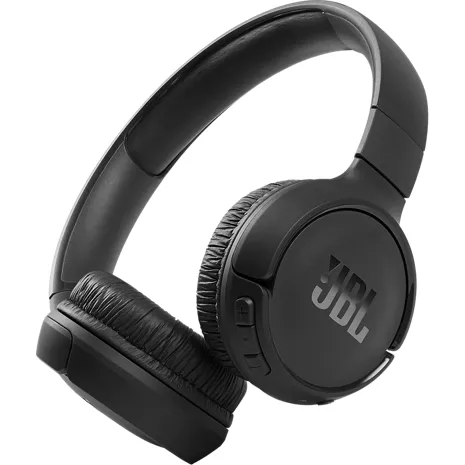
Audífonos JBL Tune 510BT
Color
Precio
$49.99
Special financing offer exclusively for Verizon Visa® Card holders.
Details
Cantidad
Este artículo solo está disponible para Retiro rápido.
Devoluciones gratis dentro de los 30 días.Detalles
Obtenlo rápido
Retiro rápido gratis
Seleccionar una tiendaBatería de larga duración.
Con hasta 40 horas de duración de la batería, pueden durar más que tu lista de reproducción más larga.¹ Y, si necesitas una carga rápida, puedes obtener hasta 2 horas de autonomía en 5 minutos.¹
¹ La duración de la batería y los ciclos de carga varían según el uso, los ajustes y otros factores; los resultados reales variarán.
Reseñas
4.0
233 reseñas
86 % de las reseñas recomiendan este producto.
Love these!
natehead . 14 days ago
jbl.com Originally posted on jbl.com
Au top du top
Allebelge . 20 days ago
jbl.com Originally posted on jbl.com
Características
- Sonido JBL Pure Bass
- Streaming inalámbrico por Bluetooth 5.0
- Batería de hasta 40 horas de duración¹
- Hasta dos horas de duración de la batería con una carga de cinco minutos¹
- Conexiones multipunto
- Llamadas con manos libres
- Diseño liviano, cómodo y plegable
- Compatible con asistentes de voz
Especificaciones
- Peso: 5.6 oz
- Tamaño del controlador: controlador dinámico de 1.26 pulgadas
- Fuente de alimentación: 5 V/1 A
- Tipo de batería de los audífonos: batería de iones de litio (3.7 V/450 mAh)
- Tiempo de carga: 2 horas
- Tiempo de reproducción con el Bluetooth activado: hasta 40 horas
- Respuesta de frecuencia: 20 Hz – 20 kHz
- Impedancia: 32 ohm
- Sensibilidad: 103.5 dB SPL@ 1 kHz 1 mW
- SPL máximo: 95 dB
- Sensibilidad del micrófono: -29 dBV@ 1 kHz/Pa
- Versión de Bluetooth: 5.0
- Versión del perfil de Bluetooth: A2DP v1.3, AVRCP v1.6, HFP v1.7s
- Rango de frecuencia del transmisor Bluetooth: 2.4GHz — 2.4835GHz
- Potencia transmitida por Bluetooth: < 8 dBm
- Modulación transmitida por Bluetooth: GFSK, π/4 DQPSK, 8DPSK
- Temperatura máxima de funcionamiento: 45°C
SKU Nº
SKU Nº
JBLT510BTBLKAM
En la caja
- Audífonos JBL Tune 510BT
- Cable para cargar USB-C
- Tarjeta de garantía
- Tarjeta de advertencia
- Guía de inicio rápido
JBL Audífonos Tune 510BT - Reseñas
4.0
233 reseñas
86 % de las reseñas recomiendan este producto.
Love these!
natehead . 14 days ago
jbl.com Originally posted on jbl.com
Au top du top
Allebelge . 20 days ago
jbl.com Originally posted on jbl.com
Brooke 3 . 1 month ago
jbl.com Originally posted on jbl.com
Disappointed in the product.
Rosa winfrey . 1 month ago
Customer Support - 1 month ago
Thank you for your inquiry. Please be advised that our JBL Tune 510BT and other JBL products have an automatic 1-year warranty period upon purchase. If you need assistance with your unit, feel free to contact us. https://support.jbl.com/us/en/#contactjbl.com Originally posted on jbl.com
Didn’t Work
Insaneburger12 . 2 months ago
Customer Support - 2 months ago
Thanks for your feedback. We would like to work with you directly regarding your issue with your JBL Tune 510BT and provide further troubleshooting steps if needed. Please contact us.jbl.com Originally posted on jbl.com
Midbosseddyg . 2 months ago
jbl.com Originally posted on jbl.com
Great sound
Khanya . 2 months ago
jbl.com Originally posted on jbl.com
would buy again
Des73 . 2 months ago
jbl.com Originally posted on jbl.com
Login glitch saps new customer time and patience
Snick . 2 months ago
Customer Support - 2 months ago
Thanks for your feedback. We appreciate your input and we'll make sure to forward it to the appropriate team.jbl.com Originally posted on jbl.com
I bought one, tried, liked and ordered two more.
rjonet . 2 months ago
jbl.com Originally posted on jbl.com
JBL Tune 510BT Headphones FAQs
NikkiB . Dec 4, 2025
Can you use these for gaming ?
Thanks for your question. Yes, you can use our JBL Tune 510BT for gaming, but since it’s a Bluetooth headphone, you may experience a slight audio delay in fast-paced games. It works fine for casual gaming, but it was mainly designed for music listening and everyday use. If you’re looking for something optimized for gaming, we recommend checking out our JBL Quantum series.
Dog Momma . Dec 4, 2025
Are these Tune 510BT noise cancelling?
Thanks for your question. Our JBL Tune 510BT does not have noise-cancelling, it’s a standard Bluetooth headphone without ANC.
Larry1963 . Nov 27, 2025
How do I know what model I have
Thank you for your inquiry. The model name is usually visible on the original box or on the product itself. If it’s not, we can verify it using the product’s serial number. For further assistance, please contact our customer support.
Eric C . Nov 21, 2025
does it connect wired as well
Thank you for your inquiry. The JBL Tune 510BT headphones do not have an audio port for connecting with a wired audio cable. However, you can still enjoy audio using their Bluetooth functionality. Simply pair the headphones with your Bluetooth-enabled device to listen to music or other audio content.
Jmrty . Nov 12, 2025
How long is charging cable?
Thanks for your question. The charging cable of our JBL Tune 510BT is 0.25m long.
Kaptaink . Oct 21, 2025
How can I set volume to mid range (5) instead of the default (10)
Thank you for your question. Unfortunately, we cannot modify the mid-range frequencies of our JBL Tune 510BT headphones, as this feature is not supported by our JBL Headphone app. As an alternative, you can download a music player app that includes a built-in equalizer, allowing you to adjust the sound to your preference.
Donald . Aug 1, 2024
How does these headphones work. I’m looking to purchase headphones to assist my 86 year old Mom with hearing people and the TV.
These headphones will connect to devices via bluetooth. -Joseph
WillMac . Apr 11, 2024
How to reattach the earphone cushions
Thank you for reaching out. We're here to help with your JBL Tune 510BT. Our customer support sent you an email from HCG Customer Support for further assistance with replacing your ear pads.
TimothyMB . Mar 20, 2024
What does a white light on the TUNE510BT mean? I turned on my headphones and all I get is a white light.
Thanks for reaching out. The white light of the JBL Tune 510BT when blinking indicates that the unit is turned on, on the other hand, if it's a solid white, it means the unit is fully charged. To enter into pairing mode for the first time, press the power button for five seconds so you can connect it to your device. It will show a blinking blue light. Make sure that the Bluetooth on your mobile phone is turned on, then look for the name of the headphones on the available devices. Tap JBL Tune 510BT and the blue light should be solid once successfully connected.
Mike Merlin . Jan 11, 2024
Are these headphones dual voltage? 110-240V?
Thanks for your inquiry. Our JBL Tune 510BT only requires a 5V/1A power supply.