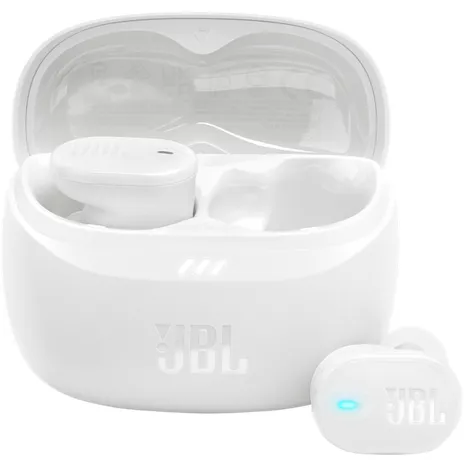
JBL Audífonos con cancelación de ruido Tune Buds 2 True Wireless
Color
Precio
$109.99
$9.17/mo with 12 months financing exclusively with Verizon Visa® Card.
Details
Cantidad
Disponible solo en línea.
Devoluciones gratis dentro de los 30 días.Detalles
Obtenlo rápido
Envío gratis en 2 días
¹Battery life and charge cycles vary with use, settings, and other factors; actual results will vary.
²IP54 rating shows that a device is protected from limited amounts of dust and splashes water from all directions.
Reseñas
3.6
48 reseñas
91 % de las reseñas recomiendan este producto.
Battery sucks
Rg36 . 9 days ago
Customer Support - 8 days ago
Thank you for bringing this to our attention. We would love to look further into your concern. Please contact our customer support for assistance.jbl.com Originally posted on jbl.com
Extremely disappointed
JCL22 . 1 month ago
Customer Support - 1 month ago
We'd like to work with you directly to address the issues you're experiencing with your unit. Please contact our customer support team via this link: https://support.jbl.com/us/en/#contactjbl.com Originally posted on jbl.com
Características
- Sonido JBL Pure Bass con sonido espacial
- Cancelación de ruidos adaptativa con Smart Ambient
- 6 micrófonos para llamadas perfectas
- Personi-Fi 3.0
- Hasta 48 horas de reproducción total¹
- Resistencia al polvo y al agua IP54²
- Conexión multipunto
- Fast Pair habilitado por Google
- Aplicación JBL Headphones
Especificaciones
- Dimensiones: 1.17 x 2.46 x 1.88 pulgadas
- Peso: 0.11 lb
SKU Nº
SKU Nº
JBLTBUDS2WHTAM
En la caja
- JBL Audífonos con cancelación de ruido Tune Buds 2 True Wireless
- Estuche de carga
- Cable para cargar USB tipo C
- Puntas en 3 tamaños
- Producto QSG
- Hoja de seguridad
- Garantía
- Tarjeta de advertencia
JBL Tune Buds 2 True Wireless Noise Cancelling Earbuds Reviews
3.6
48 reseñas
91 % de las reseñas recomiendan este producto.
Battery sucks
Rg36 . 9 days ago
Customer Support - 8 days ago
Thank you for bringing this to our attention. We would love to look further into your concern. Please contact our customer support for assistance.jbl.com Originally posted on jbl.com
Extremely disappointed
JCL22 . 1 month ago
Customer Support - 1 month ago
We'd like to work with you directly to address the issues you're experiencing with your unit. Please contact our customer support team via this link: https://support.jbl.com/us/en/#contactjbl.com Originally posted on jbl.com
Falling out constantly
Preston P J . 3 months ago
Customer Support - 2 months ago
We'd like to work with you directly to address the issues you're experiencing with your unit. Please contact our customer support team via this link: https://support.jbl.com/us/en/#contactjbl.com Originally posted on jbl.com
Thanks for this product!
KathrynH . 3 months ago
jbl.com Originally posted on jbl.com
Sandra dee . 3 months ago
jbl.com Originally posted on jbl.com
Chanel the pairing
Brian1982 . 3 months ago
Customer Support - 3 months ago
Thanks for your feedback. Our JBL Tune Buds 2 supports multipoint connection and can connect up to two devices simultaneously. First, connect your primary device. Then, tap either the left or right earbud twice, holding the second tap for 5 seconds until you hear the pairing mode. Finally, connect your second device.jbl.com Originally posted on jbl.com
Deens . 3 months ago
Customer Support - 3 months ago
Thank you for your feedback on our JBL Tune Buds 2. We recommend trying the different ear tip sizes included with your headphones to find the best fit. To achieve the best seal and secure fit, you must create a tight seal within your ear canal. To do this, angle the ear tip slightly downward to make it easier to insert into your ear canal, gently twist the ear bud to fit it securely into the shape of your ear, and continue twisting the ear bud into your ear canal. If you need more help, please contact us.jbl.com Originally posted on jbl.com
Won’t stay in ears
Me again . 3 months ago
Customer Support - 3 months ago
We appreciate your feedback. Our JBL Tune Buds come with three different sets of ear tips designed to help ensure a comfortable and secure fit. I recommend trying out each set to find the one that fits your ears best. Alternatively, you can explore third-party ear tips that may provide a better fit for you. If you need more assistance, please reach out to our support team directly. We’re here to help!jbl.com Originally posted on jbl.com
Not noise cancelling
Bart3193 . 4 months ago
Customer Support - 3 months ago
Thanks for your feedback. Our JBL Tune Buds 2 TWS feature noise cancellation designed to help reduce background noise, such as airplane sounds. However, they may not completely eliminate very loud or high-pitched noises, as these can be more challenging to filter out. We'll make sure your feedback gets to the right team, and let us know if you have other questions in the future.jbl.com Originally posted on jbl.com
Great but...
RADGIRL78 . 4 months ago
Customer Support - 4 months ago
Thank you for sharing your experience with the JBL Tune Buds 2. While we strive for all our products to meet the highest standards, we understand this wasn't the case for you. Your feedback is important and will be relayed directly to our product development team as part of our ongoing efforts to enhance our offerings.jbl.com Originally posted on jbl.com
JBL Tune Buds 2 True Wireless Noise Cancelling Earbuds FAQs
Rsrr . Jan 6, 2026
Does this JBL app provide equalization
Thanks for your question. Yes, our JBL Tune Buds 2 are supported by the JBL Headphones app, and you can modify their EQ settings using the app.
Janiece . Dec 5, 2025
Are these Bluetooth
Yes, these connect via Bluetooth. -Dee
Lauren65 . Nov 30, 2025
Are these earbuds nickel-free? If not, are any of your other models?
Thank you for your inquiry. Our product may contain nickel in some metal components. Any nickel content and release comply with all applicable safety regulations in the markets where the product is sold. On the other hand, here are the three verified products that are nickel-free. JBL Reflect Aero, Live Pro 2, Tune Buds.
Sassycat78 . Oct 31, 2025
Is the noise canceling strong enough to be effective on an airplane?
Thank you for your inquiry. Our JBL Tune Buds 2 features adaptive noise cancellation that automatically adjusts its noise-cancelling strength to match your real-time environment, providing an enhanced listening experience.
Dirtydoey . Oct 25, 2025
How to activate the voice assistant
Thanks for your inquiry. To activate the voice assistant on your JBL Tune Buds 2 TWS, simply press and hold either the left or right earbud for five seconds. If you need more help, please contact our customer support.
Jelpie . Sep 28, 2025
Do these have the ability to pause audio and video by tapping them? If not then do any JBL earbuds have that functionality.
Thanks for your question. Our JBL Tune Buds 2 do support playback control. A single tap on either earbud will play or pause your audio or video.
Zzzzzzzzzz . Sep 6, 2025
How are they different from the original Tune Buds?
Thank you for your inquiry. Our JBL Tune Buds 2 is upgraded and updated. This model has features like JBL Deep Bass Sound and Spatial Sound, which our JBL Tune Buds do not have. JBL Deep Bass refers to a sound signature that is typically amplified, with a focus on sub-bass and rumble-heavy sound quality. Meanwhile, Spatial Sound is an innovative 3D audio technology that provides a more natural and engaging listening experience by making sounds appear to originate from different angles and distances, including from above and below you. For more details about the product, please feel free to visit here: https://www.jbl.com/earbuds/TUNE-BUDS-2.html
klklklk . Sep 3, 2025
how long do they last
Thank you for your question. Our JBL Tune Buds 2 TWS offer up to 12 hours of playback time with ANC turned off, and up to 10 hours with ANC enabled. Please note that these are maximum estimates; actual battery life may vary depending on volume level, content type, and usage conditions.
JBL Tune Buds 2 . May 20, 2025
Are they as good as the JBL Live Free eat buds
The Tune Buds have a better mic performance and a slightly longer continuous battery life. On the other hand, the JBL Live Pro TWS have a better noise isolation performance that blocks out a wider range of ambient noise, ~Ivone