PopSockets PopGrip Pokémon Pikachu Poke Ball
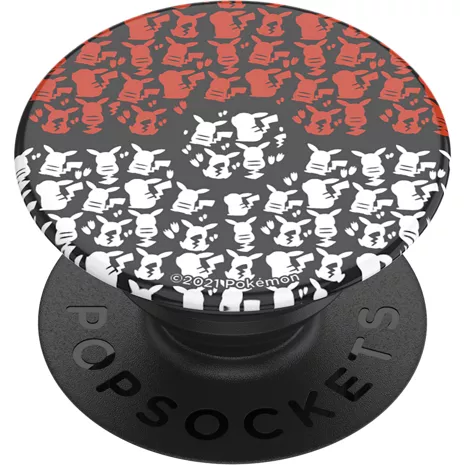
Color

Este artículo solo está disponible para Retiro rápido.
Devoluciones gratis dentro de los 30 días.Detalles
Obtenlo rápido
Retiro rápido gratis
Seleccionar una tiendaReseñas
4.1
33 reseñas
100 % de las reseñas recomiendan este producto.
Style or Defect?
Amy G. . 5 months ago
PopSockets Originally posted on PopSockets
Super Cute!!
Kim H. . 5 months ago
PopSockets Originally posted on PopSockets
Características
- Ofrece un agarre firme de tu dispositivo
- Funciona como una práctica base manos libres
- Compatible con la mayoría de los PopSockets PopMounts
- Cambia con facilidad la parte superior para cambiar el estilo
- Se pueden reubicar
- Se fija a la mayoría de los dispositivos y estuches
- Fácil de quitar para cargar de forma inalámbrica
- Se adhiere a la mayoría de las fundas de plástico duro y suave
Especificaciones
- Dimensiones: 1.5 x 0.25-0.86 pulgadas.
- Peso: 0.21 oz
SKU Nº
SKU Nº
PS112204
En la caja
- PopSockets PopGrip Pokémon Pikachu Poke Ball
Reseñas del PopSockets PopGrip Pokemon Pikachu Poke Ball
4.1
33 reseñas
100 % de las reseñas recomiendan este producto.
Style or Defect?
Amy G. . 5 months ago
PopSockets Originally posted on PopSockets
Super Cute!!
Kim H. . 5 months ago
PopSockets Originally posted on PopSockets
PowerPuff Backspin!
Jessica . 1 year ago
PopSockets Originally posted on PopSockets
Pop Sockets are a cool invention
Annie T. . 1 year ago
PopSockets Originally posted on PopSockets
Love the glow in the dark!
Katie W. . 1 year ago
PopSockets Originally posted on PopSockets
Fun protocol
Lee M. . 1 year ago
PopSockets Originally posted on PopSockets
Not what I thought
Cindy M. . 1 year ago
PopSockets Originally posted on PopSockets
UV reflection is so hot!
Tito M. . 1 year ago
PopSockets Originally posted on PopSockets
It's cute
Felisha . 2 years ago
PopSockets Originally posted on PopSockets
Cute
Sara . 2 years ago
PopSockets Originally posted on PopSockets
PopSockets PopGrip Pokemon Pikachu Poke Ball FAQs
There are no questions, be the first to ask one.