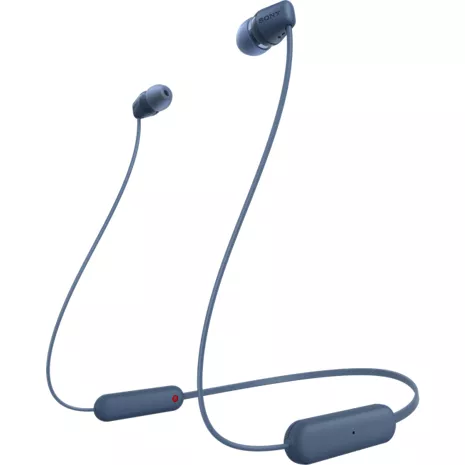

Sumérgete en tus canciones favoritas con los audífonos intrauditivos inalámbricos WIC100. La banda flexible para el cuello es cómoda de llevar en la nuca y garantiza un ajuste estable. La clasificación IPX4 a prueba de salpicaduras y sudor puede soportar tus entrenamientos más duros.¹ 360 Reality Audio mejora la calidad de los archivos de música comprimidos y de la música en streaming a través de DSEE. Realiza llamadas manos libres simples y claras estés donde estés. Los botones de fácil manejo permiten reproducir, pausar, saltar pistas y ajustar el volumen. Sincroniza tus audífonos fácilmente con Fast Pair. Además, son compatibles con Siri para que puedas usar tu asistente de voz estés donde estés.
Batería de larga duración.
Con una batería de hasta 25 horas de duración, puedes aprovechar tu día sin tener que preocuparte de cargarlos.²
Ve más allá con la aplicación.
Personaliza los ajustes de sonido para disfrutar una experiencia de alta calidad con EQ Custom a través de la aplicación Sony | Headphones Connect.
¹ IPX4: soporta salpicaduras de agua. No sumergir.
² La duración de la batería y los ciclos de carga varían según el uso, los ajustes y otros factores; los resultados reales variarán.
Batería de larga duración.
Con una batería de hasta 25 horas de duración, puedes aprovechar tu día sin tener que preocuparte de cargarlos.²
Ve más allá con la aplicación.
Personaliza los ajustes de sonido para disfrutar una experiencia de alta calidad con EQ Custom a través de la aplicación Sony | Headphones Connect.
¹ IPX4: soporta salpicaduras de agua. No sumergir.
² La duración de la batería y los ciclos de carga varían según el uso, los ajustes y otros factores; los resultados reales variarán.
Reseñas
4.5
Calificación 4.5 de 5
107 reseñas
97 % de las reseñas recomiendan este producto.
Headphones
5 out of 5 rating
Dummy . 1 year ago
Work well and inexpensive
Wasted money
1 out of 5 rating
Mimi . 1 year ago
These absolutely kill my ears. Will not stay in properly
Características
- Con una batería de hasta 25 horas de duración²
- DSEE
- Clasificación de resistencia al agua IPX4¹
- Llamadas manos libres más simples y claras
- Aplicación Sony | Headphones Connect
- Botones de fácil manejo para reproducir, pausar, saltar y ajustar el volumen
- Forma equilibrada alrededor del cuello para un ajuste estable
- Banda flexible para el cuello
- Emparejamiento rápido
- 360 Reality Audio
- Compatibles con el asistente de voz Siri
Especificaciones
- Dimensiones: 2.75 x 0.75 x 6.25 pulg.
- Peso: 2.62 oz
SKU Nº
SKU Nº
WIC100L
En la caja
- Sony Audífonos intrauditivos inalámbricos WIC100
- Tamaños adicionales de audífonos
- Manual
Reseñas de los audífonos intrauditivos inalámbricos Sony WIC100
Wasted money
1 out of 5 rating
Mimi . 1 year ago
These absolutely kill my ears. Will not stay in properly
No offer given after they gave me a price with 10& off I paid full price
1 out of 5 rating
Nancy . 1 year ago
Yes, I'd recommend this product.
I bought these headphones with a promotion of 10$ off… I still paid the regular price… disappointment… sent item with usps which doesn’t bring packages upstairs and don’t sign… put it in another mailbox without signature.. for me to end up paying for the item again. Never again accept a promotion from them
Amazing battery life
5 out of 5 rating
Rocky . 2 years ago
Yes, I'd recommend this product.
Good sound quality but even more amazing battery life, truly lasts 24 hours and a light design making it super comfy to wear
Perfect for on a budget
4 out of 5 rating
Stefany Z. . 2 years ago
Yes, I'd recommend this product.
[This review was collected as part of a promotion.] They do what they’re supposed to the bass isn’t too great the quality is good but can be better I just don’t really expect it at that price point it’s something basic that won’t disappoint
sony.com Originally posted on sony.com
Love!
5 out of 5 rating
Anvher . 3 years ago
Yes, I'd recommend this product.
[This review was collected as part of a promotion.] I honestly love how lightweight, user-friendly, and portable these headphones are! They’re extremely comfortable for all day use, have great battery life that serves me well whether I’m working or traveling, and are honestly perfect for on the go. Best of all though, the sound quality is wonderful, I absolutely love them!
sony.com Originally posted on sony.com
Nice headphones from Sony
4 out of 5 rating
ashleykp . 3 years ago
Yes, I'd recommend this product.
[This review was collected as part of a promotion.] I recently purchased these and have been really happy with them. They are very lightweight and comfortable to wear, making them perfect for long listening sessions. The sound quality is excellent and the headphones have ok battery life, so I can use them for a while without needing to charge them. The Bluetooth connection is strong and I have not experienced any issues with dropouts or interference. Overall, I would highly recommend the these to anyone in need of a reliable and high-quality pair of wireless headphones.
sony.com Originally posted on sony.com
Sounds great
5 out of 5 rating
Dad2Eight . 3 years ago
Yes, I'd recommend this product.
[This review was collected as part of a promotion.] I got these for my wife to use while she is at work. She also has an iPhone so it helps her. They were pretty simple to set up after installing the app. She really likes them! They are great quality for a pair of wireless buds!
sony.com Originally posted on sony.com
Very clear
5 out of 5 rating
Mbrown92172 . 3 years ago
Yes, I'd recommend this product.
[This review was collected as part of a promotion.] These earphones are wonderful! They are well made! The sound is very clear and precise whether in a phone call or just listening to music. I highly recommend!
sony.com Originally posted on sony.com
Great headphones!
5 out of 5 rating
Courtney4445 . 3 years ago
Yes, I'd recommend this product.
[This review was collected as part of a promotion.] I absolutely love these headphones! They are super easy to use and produces great sound quality! I love how they blue tooth and don’t have to hook up to a device.
sony.com Originally posted on sony.com
Preguntas frecuentes de los audífonos intrauditivos inalámbricos Sony WIC100
Bluetooth connectivity . Sep 25, 2025
How do you connect
Answer from Verizon Customer Support6 months
To connect your Sony WI-C100 Wireless In-ear Headphones, first, turn on the headset and your Bluetooth device. For the first-time pairing, the headset will automatically enter pairing mode. For subsequent pairings, press and hold the (power) button for about 5 seconds until the indicator flashes twice and you hear "Bluetooth pairing". On your device, enable Bluetooth, select "WI-C100" from the list of available devices, and complete the connection.
Will . Aug 27, 2024
Are they compatible with all IPhones?