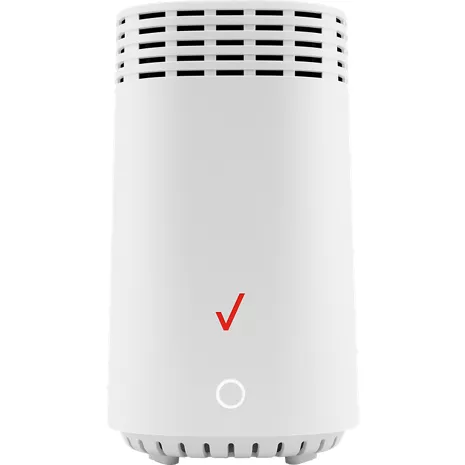
Verizon Extensor de Wi-Fi E3200 para 5G Home
Color
Precio
$199.99
$16.67/mo with 12 months financing exclusively with Verizon Visa® Card.
Details
Cantidad
Devoluciones gratis dentro de los 30 días.Detalles
Obtenlo rápido
Envío gratis en 2 días
Retiro rápido gratis
Seleccionar una tiendaAmplía tu cobertura. El extensor E3200 está diseñado para funcionar con tu 5G Home Verizon Internet Gateway para ampliar la cobertura de tu señal Wi-Fi.
Una experiencia de Wi-Fi óptima.
Wi-Fi 6 proporciona una conexión rápida y eficiente a internet, para que puedas jugar, hacer streaming o videollamadas con tranquilidad.
Red autoorganizada.
La dirección automática de banda y de punto de acceso mediante tecnología SON garantiza que tu dispositivo se conecte a la mejor conexión disponible para un mejor rendimiento.
Reseñas
2.5
87 reseñas
35 % de las reseñas recomiendan este producto.
Terrible solution
BenJ . 3 months ago
Do Better Verizon
Nancy . 4 months ago
Características
- Amplía la cobertura Wi-Fi de la Verizon Internet Gateway
- Wi-Fi 6
- Dirección automática de banda y de punto de acceso mediante tecnología SON
- Antenas tribanda 4x4
- 2 puertos Gigabit LAN
- Puerto coaxial compatible con LAN MoCA 2.5
- Botón WPS
Especificaciones
- Dimensiones: 5.31 x 5.94 x 9.25 pulgadas
- Peso: 5.22 oz
SKU Nº
SKU Nº
E3200
En la caja
- Verizon Extensor de Wi-Fi E3200 para 5G Home
- Adaptador de energía
- Guía de configuración
Verizon Extensor de Wi-Fi E3200 para 5G Home - Reseñas
2.5
87 reseñas
35 % de las reseñas recomiendan este producto.
Terrible solution
BenJ . 3 months ago
Do Better Verizon
Nancy . 4 months ago
Stronger signals
Mike Mo . 6 months ago
Poor signal to the extender
Craig . 7 months ago
Love it! Once the setup headache was complete…
Chris GVL . 7 months ago
Confused
Pam Molloy . 8 months ago
Heck compatibility before ordering!
SRQ Dave . 8 months ago
Installing etender
Bill . 1 year ago
Working So Far, Lots of trial and error
Joe D . 1 year ago
It worked for a while
Mad at Verizon . 1 year ago
Verizon E3200 Wi-Fi Extender for 5G Home FAQs
WiFi extender . Mar 18, 2026
I need a number to call to order a replacement WiFi extender
The link below will provide several different methods of contact to reach us for any assistance https://www.verizon.com/digital/nsa/nos/ui/ngd/contactus -Anthony
new customer to extender . Mar 9, 2026
my extender E3200 is staying solid yellow, is it connected correctly or is it too close to wifi modem
A solid yellow light on your Verizon E3200 extender typically indicates a poor or no connection to your router, meaning it is not connected correctly. It usually signifies that the signal is too weak, the device is too far away, or the pairing process failed. A solid white light is the goal. -Sarge
Lan Port . Mar 6, 2026
Does the LAN port work as an ethernet pass through?
The LAN ports on the Verizon E3200 Wi-Fi Extender function as an Ethernet pass-through (bridge), allowing you to connect wired devices like smart TVs, gaming consoles, or computers directly to it. For more information, contact Verizon Customer Service at 800-922-0204. -Ross
Yanoosh . Mar 3, 2026
I have a cr1000a router and 2 e3200extenders installed and are working. I need another extender. when I plug a new e3200extender in with coax, a yellow light appears. can I use a cat8 cable to connect a new extender an existing extender instead of coax?
For support for your Wi-Fi Extender, please reach out to us here: https://www.verizon.com/digital/nsa/nos/ui/ngd/contactus -Joe
Kaitlyn . Feb 4, 2026
I have tried connecting using the ethernet cable. I get a solid blue light each time and does not turn white. I have also tried via the App or WPS and each time the status indicator turns solid yellow. What can i do get this connected
You can find a complete guide to set up and pair your device at https://espanol.verizon.com/support/knowledge-base-305627/ -James
rpender . Jan 12, 2026
whats the purpose of bluetooth connection if it has to be cabled?
AZ Sunshine . Jan 12, 2026
Do you have to leave the extender plugged into the router at all times? How does it extend coverage if it is sitting right next to the router?
No, it does not need to be plugged in to the router at all times. ~Freddy
Red light . Dec 26, 2025
Red light showing
A red light indicates a potential problem. Find Support link https://espanol.verizon.com/support/knowledge-base-306062/ ~Joe M
Jim S . Dec 25, 2025
Does the extender require an ether net connection to the Verizon router?
It would need to be connected with either coax or Ethernet cable. -Cryssie
Amed . Nov 30, 2025
How do I know that the extender is connected?
You will know your Verizon network extender is connected by checking the solid blue Power/Status LED light, verifying the "In Service" message on the device's display, or by dialing #48 on your phone and listening for the confirmation announcement.