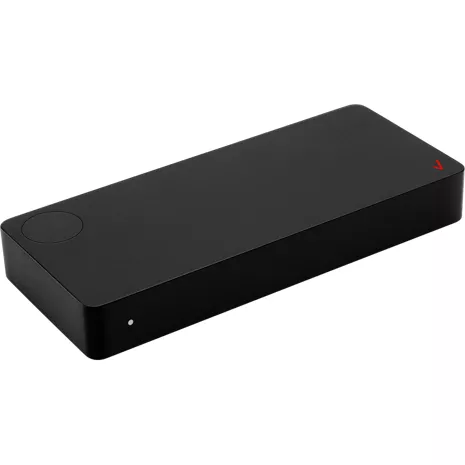
Verizon Dispositivo Stream TV
Color
Precio
$69.99
Special financing offer exclusively for Verizon Visa® Card holders.
Details
Cantidad
Devoluciones gratis dentro de los 30 días.Detalles
Obtenlo rápido
Envío gratis en 2 días
Retiro rápido gratis
Seleccionar una tiendaVideo de alta definición.
Haz streaming de tus películas y programas de televisión favoritos en ultra alta definición de hasta 4K¹, con 4 veces la resolución de HD total y una gama de colores más profunda y amplia.
Miles de películas y programas de televisión.
Hay cientos de aplicaciones de streaming disponibles para descargar desde Google Play Store³, como Netflix, Disney+, Apple TV+ y muchas más. Los nuevos lanzamientos y los clásicos favoritos pueden alquilarse o comprarse en Stream TV Store² y los canales gratuitos en vivo y en directo están disponibles en Pluto TV: basta con solo oprimir el botón de guía.
Control remoto de próxima generación.
El control remoto por voz de Stream TV se conecta por Bluetooth y puede controlar la potencia y el volumen del televisor, la barra de sonido o el receptor de audio, para que puedas controlar tu sistema de entretenimiento desde un solo control remoto. El botón Asistente de Google³ activa la búsqueda por voz y el botón Find My Remote hace que el control emita un sonido de "beep" para que puedas encontrarlo rápidamente cuando lo pierdas.
Interfaz de usuario sencilla y personalizable.
Fija tus aplicaciones favoritas en la pantalla de inicio para acceder a ellas fácilmente o encuentra tu próxima película favorita con recomendaciones personalizadas. Cuando sepas exactamente lo que quieres ver, la función de búsqueda inteligente te mostrará los resultados de todos tus servicios suscritos.
¹Se requieren dispositivos compatibles con 4K. La visualización de contenido 4K se verá afectada por otros factores como la velocidad de internet, la congestión de la red doméstica y el sistema operativo de los dispositivos utilizados para acceder al contenido.
² Compra o alquiler disponibles a través del dispositivo Stream TV o la aplicación Stream TV en la plataforma Android. Las compras de aplicaciones no son compatibles con iOS.
³ Se aplican las condiciones del servicio de Google.
Reseñas
3.2
349 reseñas
54 % de las reseñas recomiendan este producto.
A Good Device
Dave . 4 months ago
The Verizon Team - 4 months ago
Thanks for the wonderful review! One product for all of your streaming needs - that's the Stream TV experience! Please report any feedback or concerns through the mobile app (settings > help > report a problem) or send an email to android-appsupport@verizon.com. Thank you!Service is so so if you don’t need to watch sports, Service is OK do not I do not recommend
Dave K . 5 months ago
Características
- Streaming compatible con 4K UHD¹
- Interfaz de usuario personalizable
- Búsqueda por texto y voz con el Asistente de Google³
- Chromecast integrado³
- FInd My Remote (Encuentra mi control remoto)
- Integración con Pluto TV
- Aplicación Stream TV para smartphone o tablet²
Especificaciones
- Dimensiones: 5.9 x 2.5 x 0.9 pulgadas
- Peso: 5.1 oz
- Vídeo: Hasta 2160p (4K UHD) a 60 FPS, HDMI 2.1 con HDCP 2.2 y compatibilidad con CEC
- Formatos de audio: Dolby Digital Plus, Dolby Atmos (directo), DTS-HD (directo), MP3/AAC/MPEG
- Inalámbrico: WiFi 6 - doble banda de 2.4 GHz y 5.0 GHz, Bluetooth 5.0
- Sistema operativo: Android TV 10
- Control de voz: Asistente de Google
SKU Nº
SKU Nº
ASK-STI6220
En la caja
- Verizon Dispositivo Stream TV
- Control remoto por voz de Stream TV
- Cable HDMI
- Cable USB-C
- Adaptador de energía
- Soporte de montaje y herrajes
Verizon Dispositivo Stream TV - Reseñas
3.2
349 reseñas
54 % de las reseñas recomiendan este producto.
A Good Device
Dave . 4 months ago
The Verizon Team - 4 months ago
Thanks for the wonderful review! One product for all of your streaming needs - that's the Stream TV experience! Please report any feedback or concerns through the mobile app (settings > help > report a problem) or send an email to android-appsupport@verizon.com. Thank you!Service is so so if you don’t need to watch sports, Service is OK do not I do not recommend
Dave K . 5 months ago
Cancel all subscription. Refund asap.
Lizzy . 5 months ago
Terribly slow!
Joe R . 6 months ago
The Verizon Team - 6 months ago
Thanks for taking the time to leave us a review, Joe. Please report any feedback or concerns through the mobile app (settings > help > report a problem) or send an email to android-appsupport@verizon.com. Our support team can definitely help. Thank you.Great addition
Millissa . 6 months ago
The Verizon Team - 6 months ago
Thanks for the wonderful review, Millissa! One product for all of your streaming needs - that's the Stream TV experience! We wish you all the best.Great
Hlsjr . 6 months ago
The Verizon Team - 6 months ago
Thanks for the wonderful review! One product for all of your streaming needs - that's the Stream TV experience! We wish you all the best.Endless entertainment
Dave o . 7 months ago
stream Verizon on my smart tv
Brian . 8 months ago
The Verizon Team - 8 months ago
Thanks for taking the time to leave us a review. Please report any feedback or concerns through the mobile app (settings > help > report a problem) or send an email to android-appsupport@verizon.com. Our support team can definitely help. Thank you.tv
lisa . 8 months ago
The Verizon Team - 8 months ago
Thanks for the wonderful review, Lisa! One product for all of your streaming needs - that's the Stream TV experience! We wish you all the best.Verizon Cannot Support this Device
lsm19 . 9 months ago
Verizon Stream TV device FAQs
Fios . Mar 12, 2026
I already have 2 tv's on Fios. I have what looks like this same box for those tv's. I pay 12.00 each per month to have them. Could I use this to watch Fios on a third tv without paying the 12.00 a month for that tv
labend . Feb 23, 2026
Can I use this to stream live tv on a tv outside of my home?
This device just requires an internet connect to be able to stream to any tv. -Dee
Dianna Allen . Jan 10, 2026
Can I get a replacement power cord for my Verizon streaming box
Yes, please contact us for support: https://www.verizon.com/digital/nsa/nos/ui/ngd/contactus -Kristen
Use in RV . Dec 15, 2025
Can this be used in an RV that doesn’t have WiFi?
The Verizon Stream TV device is designed to be a streaming media player, and as such, it requires an internet connection to function and access streaming apps.
John D . Dec 13, 2025
Will the Verizon USB adapter that allows for third party IR control of the Fios TV+ box provide the same IR control of the Stream TV box?
Yes, the Verizon IR Adapter for Fios TV+ works with the new Fios Stream TV box to enable third-party IR control. ~Maria
Bill . Dec 7, 2025
If i have more than one tv do I need more than one of the Verizon streaming boxes?
Yes, each TV would need a separate Stream TV box. -Necia
mikesound87 . Nov 20, 2025
Can I watch regular TV with this box, or do I need to go through an app to do that
This box does not support regular TV. You are able to use the stream box for apps such as Netflix, Disney+, Apple TV app etc.
Oct 29, 2025
Can the stream device get connectivity through the USB-C?
Yes, but not directly for a standard internet connection; the Verizon Stream TV device gets its data via a specialized USB-C adapter, which is the Verizon Stream TV MoCA Ethernet Adapter. This adapter connects to your router (via Ethernet or coax), and then provides both power and data to the Stream TV device through a single USB-C cable. The USB-C port on the Stream TV device by itself is only used for power. -Red
Rochelle Abram . Oct 1, 2025
My tv isn't a smart TV, does this allow you to stream content similar to a Roku Stick?
Yes, this will allow you to stream content to your TV. You will need to have an HDMI connection in order to be compatible. Click here: https://espanol.verizon.com/support/stream-tv-faqs/ for more info. -Lauren
Me too . Sep 9, 2025
Do I have to buy cable to use
No, you do not need to have cable TV to use a streaming device. Additional information here: https://espanol.verizon.com/support/stream-tv-faqs/ ~Maria